
 Instagram
 WhatsApp
 Telegram
 Gmail
Gmail Outlook
 Google Calendar
 Join Slack Community
Messaging LinkedIn API Feature
Unipile’s LinkedIn API enables the integration of LinkedIn’s powerful messaging features into various software applications. This API provides developers with the capability to build LinkedIn messaging workflows, enabling each authenticated user to communicate efficiently with their connections and clients.

Messaging LinkedIn API Feature
Unipile’s LinkedIn API enables the integration of LinkedIn’s powerful messaging features into various software applications. This API provides developers with the capability to build LinkedIn messaging workflows, enabling each authenticated user to communicate efficiently with their connections and clients.
Automating Messaging into your software

Connecting Multiple LinkedIn Platforms
Unipile’s LinkedIn API allows seamless integration with various LinkedIn platforms, including LinkedIn Classic, Sales Navigator, Recruiter, and Recruiter Lite. This integration ensures that all LinkedIn messaging features are accessible within a single application.
Centralizing Messages Across Platforms
Centralize messages from multiple communication platforms, such as LinkedIn, WhatsApp, and email. This centralization helps streamline communication management by allowing users to view and respond to messages from different channels in one place.
Automating LinkedIn Messaging
One of the significant advantages of using Unipile’s LinkedIn API is the ability to automate LinkedIn messaging. Your app enables each connected user to send messages, follow-ups, and responses, making it easier to manage their engagement workflows efficiently.
Personalize Messages with Voice Notes and Attachments

Users can enhance their LinkedIn messaging by sending personalized voice notes, adding a personal touch to their communications..

Users can also include attachments such as PDFs, enabling the sharing of detailed proposals and documents directly within LinkedIn messages.
Automating Messaging Sequences with LinkedIn API

Multi-Channel Messaging Sequences
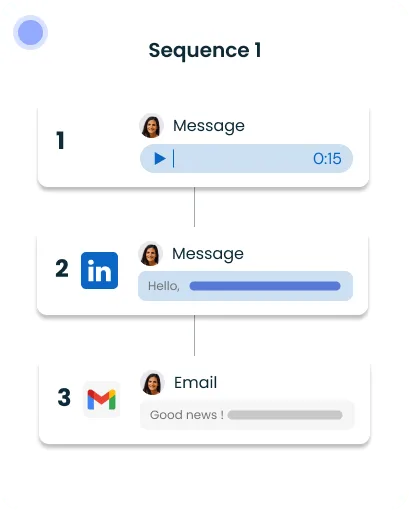
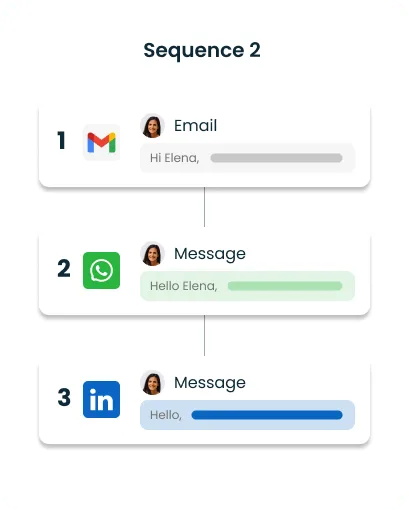
Multi-Channel Messaging Sequences
Sequence 1: LinkedIn-Centric
- LinkedIn Voice Message: Initiate with a personalized voice message.
- LinkedIn Text Message: Follow up with a customized text message.
- Email Follow-Up: Conclude with an email providing further details.
Sequence 2: Diversified Channels
- Email Introduction: Start with an introductory email.
- WhatsApp Message: Continue with a personal WhatsApp message.
- LinkedIn Follow-Up: Finish with a LinkedIn message.
Messages, voice notes, and attachments exchanged through the API are routed through the authenticated user’s own LinkedIn session. Unipile does not maintain an independent archive of conversations or contacts: each message is sent or retrieved strictly on user-initiated actions, and only the data needed for the in-flight workflow is processed.
Benefits of Integrating Unipile’s LinkedIn API for Messaging Automation
Integrating Unipile’s LinkedIn API for messaging automation offers numerous advantages for software developers and business application providers.

Increased Efficiency
Automating routine messaging tasks reduces the time and effort required for manual communication, allowing teams to focus on more strategic activities.
Enhanced Personalization
The ability to customize automated messages based on LinkedIn profile data leads to more relevant and engaging interactions with prospects and clients.
Scalable Outreach
Automation allows your users to scale their communication workflows, enabling consistent follow-up with their connections without compromising on personalization or quality.
Unlock a Wide Range of LinkedIn Functionalities

Account Connection
2 endpoints available
Messages
10 endpoints available
Users/Profiles
8 endpoints available
Posts/Comments
6 endpoints available
Specific
17 endpoints available
Webhooks
3 events available
Inboxes
4 inboxes available
Implementing the LinkedIn Messaging API

Configure API Access
Begin by registering on the Unipile Dashboard. Once registered, configure your application to connect to LinkedIn’s API endpoints, ensuring that all necessary access tokens and API keys are correctly set up.
Create Message Templates
Develop message templates that incorporate dynamic fields to allow for personalization. This enables the automated messages to be tailored to each recipient, enhancing engagement and response rates.
Deploy and Test
Perform comprehensive testing to verify that messages are sent accurately and are personalized as expected. Ensure that the integration works seamlessly and that any issues are resolved before going live.
Learn how to integrate LinkedIn
Unipile is an independent technical intermediary, not a LinkedIn partner or affiliated service. Each messaging call, inbox sync, or sequence step is executed only when one of your end users has personally connected their own LinkedIn account and has initiated the workflow from your application. Actions remain bounded by what that single user can already do from their own LinkedIn session: no shared pools of accounts, no elevated access, no activity on accounts whose owner has not actively linked them.
Ensuring Data Security with Unipile’s LinkedIn API
Secure Authentication and Regular Audits
Integrating the Send Personalized LinkedIn Message API offers both robust security and flexibility, essential for maintaining data integrity and adapting to various editorial needs. The flexibility of the API allows your users to customize their LinkedIn messaging workflows, whether sending personalized messages, InMails, or attachments, all from their authenticated account.
Integrating messaging enhances candidate communication, automating follow-ups and ensuring timely interactions throughout the recruitment process.
Automated LinkedIn messaging enriches customer profiles and streamlines outreach efforts, leading to more personalized and effective engagement with clients.
Integrating messaging capabilities automates and personalizes outreach campaigns, significantly increasing engagement and response rates from prospects.
Incorporating LinkedIn messaging into iPaaS solutions enables seamless data flow between systems, improving overall workflow efficiency and data synchronization.
LinkedIn messaging volumes, invitation quotas and cadence limits are defined by LinkedIn itself and change over time. Unipile relays the live usage signals, rate-limit headers, quota responses, error states, so your sequences can pause, back off, or reschedule gracefully. Deciding how fast a user’s inbox should move remains a customer-side decision, and each deployment must stay within the volume and tone that a single authenticated account can legitimately sustain.
Developer Advantages of Implementing the LinkedIn Messaging API


Technical Support and Integration Ease
Unipile provides comprehensive technical support to assist with any integration challenges, ensuring a smooth implementation process.
Developer Support
Dedicated development support is available to help developers effectively utilize the API, offering guidance and best practices for optimal integration.
Proactive Maintenance and Updates
Regular updates and maintenance services are provided to keep the API up-to-date and secure, ensuring continued functionality and compliance with the latest standards.
FAQs
Is Unipile an official LinkedIn partner?
No. Unipile is not affiliated with, endorsed by, or sponsored by LinkedIn. It operates as an independent technical intermediary that lets software publishers connect authenticated LinkedIn accounts to their application. Every messaging action is performed on behalf of the user who owns that account, within workflows the user has initiated. Third-party platform features and conditions may change over time.
What are the key features of Unipile’s LinkedIn API?
Unipile’s LinkedIn API offers features like automated messaging, profile retrieval, sending and receiving attachments, and integration with LinkedIn Classic, Sales Navigator, Recruiter, and Recruiter Lite.
How can Unipile’s LinkedIn API benefit ATS systems?
Integrating Unipile’s LinkedIn API with ATS systems helps recruiters keep timely interactions with candidates throughout the recruitment process, by letting each user run follow-ups from their own authenticated LinkedIn account.
Can Unipile’s LinkedIn API integrate with CRM systems?
Yes. Unipile’s LinkedIn API can integrate with CRM systems to sync customer information retrieved on behalf of the authenticated user, keep the CRM aligned with the conversations that user has on LinkedIn, and help them engage their clients with more relevant context.
What platforms can be connected using Unipile’s LinkedIn API?
Unipile’s LinkedIn API allows seamless integration with multiple LinkedIn platforms, including LinkedIn Classic, Sales Navigator, Recruiter, and Recruiter Lite, as well as other communication channels like WhatsApp and email.
How does Unipile’s LinkedIn API handle data security?
Unipile’s LinkedIn API ensures data security through compliance with GDPR, using OAuth for secure authentication, and employing industry-standard encryption protocols. Regular security audits and updates are conducted to maintain data integrity.
Who is responsible for staying within LinkedIn's messaging limits?
Unipile relays LinkedIn’s own rate limits, quotas and usage headers, so your sequences can adjust their cadence in real time. However, configuring a responsible messaging pace remains the customer’s responsibility: each deployment must stay aligned with LinkedIn’s current terms and with what a single authenticated account can legitimately sustain per day.
What messaging data can the API actually access?
The API only surfaces the conversations, messages and contacts that the authenticated user can already see from their own LinkedIn, Sales Navigator or Recruiter session. There is no cross-account lookup, no access to inboxes the user is not a participant of, and no privileged backend query. Unipile acts on what that user is already authorised to view.


