
 LinkedIn
 Instagram
 WhatsApp
 Telegram
 Gmail
Gmail Outlook
 Google Calendar
 Join Slack Community
Send Message LinkedIn API Feature
The send message feature via Unipile’s LinkedIn API allows users to automate the sending of personalized LinkedIn messages, streamlining communication and enhancing engagement. In this article, discover the full details on how to utilize this powerful feature effectively.
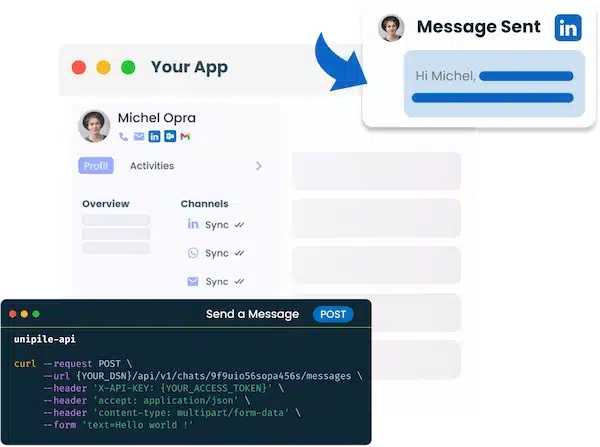
Send Message LinkedIn API Feature
The send message feature via Unipile’s LinkedIn API allows users to automate the sending of personalized LinkedIn messages, streamlining communication and enhancing engagement. In this article, discover the full details on how to utilize this powerful feature effectively.
Send a Message to a User on LinkedIn
const response = await client.messaging.sendMessage({
    chat_id: "9f9uio56sopa456s",
    text: "Hello world !"
})
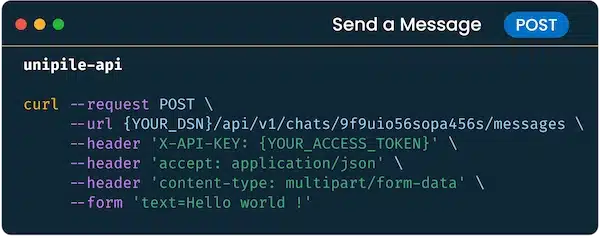
curl
--request POST

--url https://{YOUR_DSN}/api/v1/chats/9f9uio56sopa456s/messages

--header 'X-API-KEY: {YOUR_ACCESS_TOKEN}'

--header 'accept: application/json'

--header 'content-type: multipart/form-data'

--form 'text=Hello world !'
The Send a Message feature via Unipile’s API lets you initiate direct communication with LinkedIn users, even if there is no existing chat history. Use the POST /chats method to send personalized messages, ensuring seamless interaction. For detailed guidelines, visit the Unipile documentation.
Personalize Messages with Voice Notes and Attachments

Add a personal touch to LinkedIn messages with voice notes feature, offering a more engaging and expressive form of communication through the API.

Enhance LinkedIn outreach by including attachments, allowing you to share detailed documents or multimedia directly in messages via the API.
Other Features: LinkedIn InMails and Invitations
const response = await client.messaging.startNewChat({
    account_id: 'Yk08cDzzdsqs9_8ds',
    text: 'Hello world !',
    attendees_ids: ['ACoqsqsqdsqdsdqsdssj08dsqQS89QSD'],
    options: {
        linkedin: {
            api: 'classic',
            inmail: true
        }
    }
})
curl
--request POST

--url https://{YOUR_DSN}/api/v1/chats/9f9uio56sopa456s/messages

--header 'X-API-KEY: {YOUR_ACCESS_TOKEN}'

--header 'accept: application/json'

--header 'content-type: multipart/form-data'

--form 'text=Hello world !'

--form attendees_ids=j08dsqQS89QSD \'

--form linkedin[api]=classic \

--form linkedin[inmail]=true \
With Unipile’s LinkedIn API, start new chats with your connections or send InMails to users. Customize your outreach by setting the inmail property for targeted communication. Learn more in the API documentation.
Benefits of Personalizing LinkedIn Messages
Personalized messages stand out in a crowded inbox, demonstrating a genuine interest in the recipient. This can lead to higher response rates, stronger professional relationships, and improved networking opportunities. Moreover, personalized messaging can help differentiate your communication from generic, mass-sent messages, enhancing your professional image

Increased Response Rates
Personalized messages show genuine interest, capturing the recipient’s attention and leading to higher response rates, making outreach more effective.
Strengthened Professional Relationships
By tailoring your users messages, they create a more meaningful connection, fostering stronger professional relationships.
Data-Driven Insights
Empower users to analyze their message performance data, providing actionable insights that help refine and optimize personalized LinkedIn outreach for better engagement and success.
What LinkedIn Features Are Available via Unipile’s API?
| Features |
LinkedIn
|
|---|---|
| Account connection | |
| Hosted Auth: White label to connect your end users |  |
| Custom auth: connect user with credentials, cookies, your chrome extension | |
| Messages | |
| Send & Reply Messages | |
| Send an InMail | |
| List Messages, Chats & Attendees | |
| List Reactions | |
| Read Receipts | |
| Send Files attachments | |
| Receive Files attachments API | |
| Send Voice Notes | |
| Send Embed Video | |
| Users/Profiles | |
| Retrieve a Profile | |
| Retrieve & Edit own profile | |
| List all relations & Followers | |
| List all Invitations Sent & Received | |
| Handle & Cancel a received Invitation |
|
| Send an Invitation |
|
| Cancel an Invitation |
|
| List all posts, comments, reactions |
|
| Posts | |
| Retrieve & Create a post |
|
| List all comments from a post |
|
| List all posts, comments, reactions |
|
| Comment a post |
|
| List all reactions from a post |
|
| Add a reaction to a post, comment |
|
| Webhooks | |
| Account status | |
| New Message | |
| New Reaction / Read / Event | |
| Specific | |
| Retrieve Recruiter hiring projects | |
| Perform an action with a user profile | |
| Retrieve a company profile |
|
| Get raw data from any endpoint (Inbox Search, Following someone, Get own profile viewers, Social Selling Index, Retrieve posts from Feed) | |
| Get inmail credit balance | |
| Retrieve LinkedIn search parameters |
|
| Perform Linkedin search | |
| List all job postings | |
| Create a job posting |
|
| Get job posting | |
| Publish a job posting | |
| Solve a job publishing checkpoint | |
| Close a job posting | |
| List all applicants to a job posting |
|
| Get a specific applicant to a job posting |
|
| Download the resume of a job applicant |
|
| Endorse a user profile specific skill |
|
| Webhooks | |
| Account status | |
| New Message | |
| New Reaction / Read / Event | |
| Inboxes | |
| LinkedIn Classic Inbox | |
| Sales Navigator Inbox | |
| LinkedIn Recruiter Inbox | |
| LinkedIn Company Page | |

LinkedIn Features
| Features |
LinkedIn
|
|---|---|
| Account connection | |
| Hosted Auth: White label to connect your end users | |
| Custom auth: connect user with credentials, cookies, your chrome extension | |
| Messages | |
| Send & Reply Messages | |
| Send an InMail | |
| List Messages, Chats & Attendees | |
| List Reactions | |
| Read Receipts | |
| Send Files attachments | |
| Receive Files attachments API | |
| Send Voice Notes | |
| Send Embed Video | |
| Users/Profiles | |
| Retrieve a Profile | |
| Retrieve & Edit own profile | |
| List all relations & Followers | |
| List all Invitations Sent & Received | |
| Handle & Cancel a received Invitation |
|
| Send an Invitation |
|
| Cancel an Invitation |
|
| List all posts, comments, reactions |
|
| Posts | |
| Retrieve & Create a post |
|
| List all comments from a post |
|
| List all posts, comments, reactions |
|
| Comment a post |
|
| List all reactions from a post |
|
| Add a reaction to a post, comment |
|
| Webhooks | |
| Account status | |
| New Message | |
| New Reaction / Read / Event | |
| Specific | |
| Retrieve Recruiter hiring projects | |
| Perform an action with a user profile | |
| Retrieve a company profile |
|
| Get raw data from any endpoint (Inbox Search, Following someone, Get own profile viewers, Social Selling Index, Retrieve posts from Feed) | |
| Get inmail credit balance | |
| Retrieve LinkedIn search parameters |
|
| Perform Linkedin search | |
| List all job postings | |
| Create a job posting |
|
| Get job posting | |
| Publish a job posting | |
| Solve a job publishing checkpoint | |
| Close a job posting | |
| List all applicants to a job posting |
|
| Get a specific applicant to a job posting |
|
| Download the resume of a job applicant |
|
| Endorse a user profile specific skill |
|
| Webhooks | |
| Account status | |
| New Message | |
| New Reaction / Read / Event | |
| Inboxes | |
| LinkedIn Classic Inbox | |
| Sales Navigator Inbox | |
| LinkedIn Recruiter Inbox | |
| LinkedIn Company Page | |
Implementing the LinkedIn Message API
Setup API Access
Sign up an account to the Unipile Dashboard and configure your application to access LinkedIn’s API endpoints.
Design Message Templates
Develop templates that include dynamic fields for personalization.
Deploy and Test
Conduct thorough testing to ensure messages are sent correctly and personalized as intended.
Security in Integrating the Send Personalized LinkedIn Message API

Data Security and Privacy Compliance
Integrating the Send Personalized LinkedIn Message API offers both robust security and flexibility, essential for maintaining data integrity and adapting to various editorial needs. the flexibility of the API allows editors to customize and automate their LinkedIn outreach seamlessly, whether sending personalized messages, InMails, or attachments.
Personalized ATS Messaging
Integrating personalized LinkedIn messaging into your ATS enhances recruitment processes by enabling tailored communication with candidates. This feature ensures that messages are relevant, improving candidate engagement and response rates.
Send Message LinkedIn in CRM
Incorporating personalized messaging into your CRM system allows for seamless, data-driven outreach to prospects and clients. By leveraging CRM data, messages can be customized to reflect individual interests and needs, fostering stronger relationships and trust.
Custom Outreach Integration
Personalized LinkedIn messaging integration with outreach tools boosts marketing and networking efforts. It allows for automated yet personalized follow-ups, ensuring consistent and meaningful engagement with your target audience, which can lead to higher conversion rates and more successful campaigns.
Developer Benefits of Implementing Send Message LinkedIn API


Technical Support and Integration Ease
Benefit from comprehensive technical support that simplifies the integration process, ensuring a smooth and efficient setup for the LinkedIn messaging API.
Developer Support
Access dedicated developer assistance to address any technical challenges, providing expertise and solutions to optimize the implementation and functionality of your messaging system.
Proactive Maintenance and Updates
Stay ahead with proactive maintenance and regular updates, ensuring your LinkedIn messaging integration remains secure, efficient, and up-to-date with the latest features and improvements.
FAQs
What is the Send Message LinkedIn API?
The Send Message LinkedIn API allows developers to integrate LinkedIn’s messaging capabilities into their applications. This enables users to send direct messages and attachments to LinkedIn members directly from within their app.
What is the main benefit of using Unipile's Send Message LinkedIn API feature?
The primary benefit is the ability to automate and personalize LinkedIn messages, enhancing engagement and ensuring more targeted and effective communication.
How can I send InMails using the LinkedIn API?
You can send InMails by setting the inmail property to true in the API call. This allows you to reach out to LinkedIn Premium users directly, even if they are not in your connections.
Can I send voice notes and attachments through the LinkedIn API?
Yes, Unipile’s API supports sending voice notes and attachments, adding a personal and detailed touch to your LinkedIn messages, which can help engage your audience more effectively.
How do personalized messages improve LinkedIn engagement?
Personalized messages demonstrate genuine interest in the recipient, making them more likely to engage with the content. This can lead to higher response rates and stronger professional relationships.
What data can be leveraged for personalizing LinkedIn messages?
Data such as job title, company, industry, and past interactions can be used to tailor messages, ensuring they are relevant and personalized to the recipient’s specific context.
Is integrating the LinkedIn Message API secure and flexible?
Yes, the API offers robust security features, including OAuth 2.0 authentication, and provides flexibility for customization, allowing editors to adapt the messaging system to their specific needs and ensure data privacy compliance.
You may also like
Send InMail LinkedIn API: The Key to Efficient LinkedIn Interactions
Send InMail LinkedIn APIThe LinkedIn API Send InMail feature by Unipile is designed for developers and editors to facilitate seamless communication through their applications. This API enables users to send personalized InMail messages to LinkedIn members directly from their apps, enhancing...
How do I extract data from Sales Navigator API for my software?
Explore the benefits of extracting key data from Sales Navigator through a dedicated LinkedIn API for streamlined software integration.Leverage the Sales Navigator integration to access powerful LinkedIn data extraction tools, enhancing B2B sales automation and enabling advanced CRM data syncing....
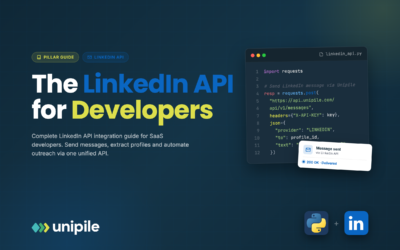
LinkedIn API Guide 2026: Complete Integration Tutorial & Best Practices
What is LinkedIn API? The LinkedIn API (Application Programming Interface) is the essential bridge between your application and LinkedIn, acting on behalf of your authenticated users. Whether you're building recruitment software, CRM systems, or workflow automation tools, understanding LinkedIn...
 EN
EN  FR
FR  ES
ES  DE
DE  IT
IT  BR
BR  NL
NL  PL
PL  TR
TR