
 LinkedIn
 Instagram
 WhatsApp
 Telegram
 Gmail
Gmail Outlook
 Join Slack Community
The Google Calendar API is a powerful tool for managing calendars and events programmatically. A Google Calendar API overview reveals that it is a RESTful API accessible via explicit HTTP calls or Google Client Libraries, encompassing most features found in the Google Calendar Web interface. Whether you’re a developer working on a project management app or an entrepreneur looking to retrieve events, the Google Calendar API can bring significant efficiency to your application. In this guide, we’ll walk you through everything you need to know about integrating and utilizing this API, including practical tips, best practices, and valuable insights that will help you get the most out of it.

What is Google Calendar API?
Google Calendar API is a tool that allows developers to access and manipulate events, calendars, and settings associated with Google Calendar. The API is a RESTful API that facilitates access through explicit HTTP calls or Google Client Libraries, highlighting that it provides most features available in the Google Calendar Web interface. By using this API, developers can build custom calendar experiences directly within their own applications, enabling seamless integration and more interactive user experiences. The Google Client Libraries facilitate interaction with the API through simplified methods compared to using explicit HTTP calls.
Importance of Google Calendar API for Developers
The Google Calendar API is vital for developers aiming to enhance user experience by integrating time-based features into their applications. It allows businesses to manage events, update events, automate reminders, and create sophisticated scheduling capabilities. The API exposes most features available through the Google Calendar Web interface, thereby bridging the functionalities between the API and user interface. For software editors, utilizing Google Calendar API ensures your product provides an effortless experience for users managing appointments, tasks, or events. Additionally, an event on a calendar can be easily modified or deleted using API calls, making scheduling more dynamic.
Getting Started with Google Calendar API
Getting started with the Google Calendar API is a straightforward process that requires a few essential steps. First, you need to create a Google Cloud Project and enable the Google Calendar API. This can be done by navigating to the Google Cloud Console, creating a new project, and searching for the Google Calendar API in the API Library. Once you’ve enabled the API, you’ll need to create credentials for your project, such as an API key or OAuth client ID.
Next, you’ll need to install the Google Client Library for your programming language of choice. The Google Client Library provides a simple and intuitive way to interact with the Google Calendar API. You can find installation instructions and documentation for the Google Client Library on the Google Developers website.
Finally, you can start using the Google Calendar API to read and write calendar data. The API allows you to retrieve events, create, update events, and delete events, as well as retrieve information about calendars and calendar lists. With its wide range of features and functionality, the Google Calendar API is a powerful tool for building calendar-based applications, enabling developers to create, manage, and integrate calendar events seamlessly. Additionally, the calendar has associated metadata that helps organize event details efficiently.
Key Features of Google Calendar API

The Google Calendar API offers a wide range of features for developers. One of the key functionalities is the ability to retrieve events from Google Calendars using the Google Calendar API, which includes setting up a Google API key and managing events effectively in both public and private calendars.
Additionally, the API allows users to create and update events, integrating various third-party tools to streamline appointment management and centralize all events on a single platform. This makes it a powerful tool for handling more than just simple event management. The calendar list is represented in a structured format, allowing users to easily access different calendar views.
Listing and Creating Events
The Google Calendar API allows developers to list existing events and create new ones seamlessly within their application. This feature is essential for managing user schedules and adding new appointments directly through your app, providing a more integrated and streamlined experience.
Update and Delete Events
Enable the modification of event details such as time, date, location, or participants, ensuring schedules are always accurate and up-to-date. Or, help maintain a clean and relevant calendar by removing outdated or canceled events promptly.
Benefits of Integrating Google Calendar API
Integrating the Google Calendar API into your application can significantly enhance its functionality by allowing seamless access to a calendar. Developing a Google Calendar API app involves configuring and running the API, which can be guided by resources on authentication and authorization for Google Workspace APIs including scheduling tools. This integration can streamline scheduling, reminders, and event management, making your app more efficient and user-friendly.
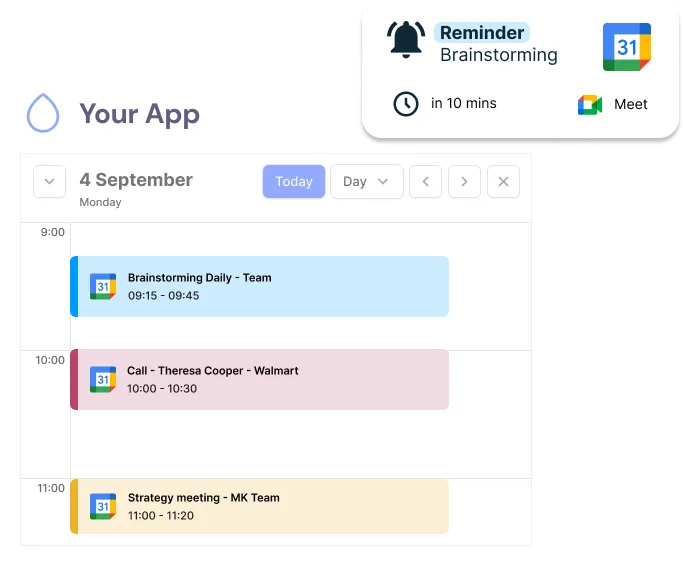
Improving User Experience with Scheduling Automation
Integrating Google Calendar API into your application helps to automate scheduling and eliminate manual work. It provides users with features like automated reminders, quick rescheduling, and easy availability checks, all of which boost user engagement and satisfaction.
Google Calendar API for Unified Calendar Management


Advanced Features: Keep Users in Your App with a Custom Design
Webhooks and Push Notifications
List Calendars
Retrieve all calendars associated with a user's account, including primary and secondary calendars
Get a Calendar
Fetch detailed information about a specific calendar by its ID
Retrieve all Events
Get a complete list of events from a calendar with support for filtering by date range and pagination
Create an Event
Create new calendar events with full support for attendees, reminders, location, and recurrence rules
Retrieve an Event
Get detailed information about a specific event including all metadata and attendee status
Edit an Event
Update existing events with new information, modify attendees, or change event details
Delete an Event
Remove events from calendars with optional notifications to attendees
Scheduler
Smart scheduling assistant to find optimal meeting times based on participant availability
Coming SoonWebhooks
Real-time notifications for calendar and event changes with automatic push updates
Powered by Google Calendar API — All features are fully compatible with Google Workspace and personal Google accounts
Setting Up a Google Cloud Project
Before you can use the Google Calendar API, you need to create a Google Cloud Project. This project will also help you manage a Firebase collection reference for organizing and managing calendar data. This is where you will manage your API credentials, access levels, and other configurations. Start by heading to the Google Cloud Console and create a new project dedicated to your application. For a full walkthrough of Google Cloud OAuth setup and app verification, including Gmail API credentials, see our dedicated guide.
Enabling the Google Calendar API

Integrating Google Calendar API with Your Application
Handling Common Errors and Best Practices
Managing Rate Limits and Quotas
Google Calendar API enforces rate limits to ensure fair usage among all developers. To handle these, it’s important to manage the frequency of your requests and implement exponential backoff in case you exceed these limits.
Error Codes and Troubleshooting
Common errors when working with the Google Calendar API include “403 Forbidden” due to insufficient permissions or “404 Not Found” when trying to access a non-existent event. Understanding these errors will help you troubleshoot more effectively.
Security and Compliance
Security and compliance are top priorities when working with the Google Calendar API. The API uses OAuth 2.0 for authentication and authorization, ensuring that only authorized users can access a calendar and modify calendar data. This robust security protocol helps protect user information and maintain the integrity of calendar events.
One important security feature of the Google Calendar API is the access control rule granting permissions based on specific roles. These rules allow you to grant a user or group different levels of access to calendar data. By implementing access control rules, you can ensure that sensitive calendar data is only accessible to authorized users, enhancing the security of your application.
Another critical security feature is data encryption. The Google Calendar API uses HTTPS encryption to protect data in transit, ensuring that the calendar is represented securely and protected from unauthorized access. This encryption helps safeguard user information and maintain the confidentiality of calendar events.
Unipile Google Calendar Integration Made Effortless


Unipile vs Self-Integration: Save Time and Gain Support
Discover the benefits of choosing Unipile’s seamless integration services instead of managing the process on your own. Java, a registered trademark of Oracle, is often used in development, and recognizing such trademarks is crucial for legal compliance. With Unipile’s Hosted Auth, you enhance system security by centralizing calendar data management while achieving easy integration across different calendar providers. This minimizes maintenance, accelerates development, and delivers a reliable and efficient authentication solution using just a single link.
One Link Hosted Auth vs. Full OAuth Flow
Unipile’s Hosted Auth makes Google Calendar integration much simpler by automating provider detection and the authentication process. This significantly reduces development complexity, saving both time and effort. By streamlining the initial setup, this solution ensures the ongoing reliability and security of your calendar connections, enabling developers to prioritize user experience improvements over backend complexities.
Expanding Versatility: Unipile’s Integration with Outlook Calendar API
To integrate Outlook Calendar, register your application in Azure Active Directory (AAD), and configure Unipile to use the application credentials. Our support team is available for assistance with any setup issues.
Conclusion
The Google Calendar API is an essential solution for developers looking to integrate time management features into their applications. This API enables access to calendars on a user’s account and efficiently manages a collection of events. It includes Google Workspace APIs, simplifying the handling of calendars on a user’s account and synchronizing an event on a calendar with other services.
The API offers advanced features such as calendar lists, where each user preference is represented by a set of configurable parameters. A single access control rule can be applied to define who can access a calendar and under what conditions. A user’s calendar list can be accessed via an API key or through OAuth authentication, ensuring precise control over sensitive data access.
Another advantage is the ability to update events and retrieve a list of all events in the calendar, including details like title, start, and end times. These features enable developers to create rich user experiences where user-specific properties are included based on their specific needs.
The Google Workspace Developers Channel provides videos and tutorials explaining how to run a simple Google Calendar API, learn how to configure, and see the Google Calendar API in action, along with tips on optimizing the use of Google client libraries. This is a valuable resource for developers who want to learn more about tricks and the latest improvements in the API.
The API also facilitates managing groups of users, making team coordination within an organization more efficient. When an event appears on the calendar, it can contain a collection of items related to times and attendees. Moreover, events can be either single or recurring, allowing for advanced scheduling management.
In summary, the Google Calendar API is a powerful and scalable platform, ideal for developers working with Google Workspace. Whether automating tasks, managing events, or synchronizing schedules, this API provides a list of common terms and advanced functionalities that ensure seamless integration. With its customization options and access to a list of all calendars, it is an invaluable tool for any application requiring robust time management capabilities.
Developer Advantages of Implementing the Calendar API


Technical Support and Integration Ease
Unipile provides comprehensive technical support to assist with any integration challenges, ensuring a smooth implementation process.
Developer Support
Dedicated development support is available to help developers effectively utilize the API, offering guidance and best practices for optimal integration.
Proactive Maintenance and Updates
Regular updates and maintenance services are provided to keep the API up-to-date and secure, ensuring continued functionality and compliance with the latest standards.
FAQs
What is the Google Calendar API and what can it be used for?
The Google Calendar API is a tool that allows developers to access, create, edit, and delete events within Google Calendar programmatically. It can be used to build custom scheduling features within applications, automate event management, and integrate calendar functionality directly into other software solutions.
How do I start using the Google Calendar API?
First, you need to create a Google Cloud Project in the Google Cloud Console. Then, enable the Google Calendar API in your project and obtain the necessary credentials to authenticate your application. Follow the API documentation to integrate it into your project.
What are the key features available through Google Calendar API?
The API allows you to list, create, update, and delete events. It also provides advanced features like event reminders, attendee management, custom calendar views, and webhooks for push notifications to track calendar changes in real-time.
How can the Google Calendar API enhance my application's user experience?
By integrating the Google Calendar API, you can automate event scheduling, enable users to view and manage their calendars directly from your app, and provide custom reminders and notifications. This enhances usability and reduces manual workload for end users.
What are some common errors encountered when using the Google Calendar API?
Common errors include “403 Forbidden” (insufficient permissions) and “404 Not Found” (trying to access a non-existent event). It’s important to ensure that the OAuth scopes requested are sufficient and that event IDs are correct. Implementing retry logic for rate limits can also help avoid issues.
What is the difference between integrating Google Calendar API by myself and using Unipile's solution?
Self-integration requires managing the OAuth flow, authentication, and ongoing maintenance. Unipile provides a simplified integration with hosted authentication, reducing development complexity, improving security, and speeding up deployment by centralizing all configuration in one place.


