
 Instagram
 WhatsApp
 Telegram
 Gmail
Gmail Outlook
 Google Calendar
 Join Slack Community
If you’re building a CRM, ATS, or Outreach tool, chances are you’re looking to embed LinkedIn features directly into your app. Whether it’s syncing conversations, sending InMails, managing contacts, or posting content, LinkedIn API Python integration has become a critical asset for SaaS editors who want to stay competitive.
But here’s the catch: LinkedIn’s official API requires joining their Partner Program, which involves a lengthy approval process. Unipile offers a faster path to integration for software publishers. That’s where Unipile comes in, a powerful unified API platform that lets you connect LinkedIn (and other channels like WhatsApp, Gmail, Instagram, Calendars…) in just a few lines of Python.
In this complete guide, we’ll show you:
- How to connect LinkedIn using Python via Unipile’s unified API
- What you can actually do with the LinkedIn API in Python: from messaging to profiles to integration workflows
- Real Python code examples based on Unipile’s SDK
- How to build a full-featured, multi-channel integration without writing 10 different connectors
Why Software Platforms Choose Python for LinkedIn Integration
Python’s simplicity and power for API automation. Python is the go-to language for many backend teams building automation and integrations. It’s fast to write, readable, and has a massive ecosystem of libraries like requests, pydantic, or asyncio that make it perfect for API workflows.
import requests

url = "https://api1.unipile.com:13111/api/v1/accounts"

headers = {"accept": "application/json"}

response = requests.get(url, headers=headers)

print(response.text)
import requests

url = "https://api1.unipile.com:13111/api/v1/users/identifier"

headers = {"accept": "application/json"}

response = requests.get(url, headers=headers)

print(response.text)
Get Access to LinkedIn API – LinkedIn Partner Way vs Unipile Shortcut (with Python)
The Official Way: LinkedIn Partner Program
LinkedIn offers several APIs through its Partner Program, each serving a distinct use case:
-
Profile API: Grants access to user profile details such as name, headline, and professional summary.
-
Connections API: Enables retrieval of a user’s first-degree network connections.
-
Share API: Allows your app to publish posts (text, URLs, media) on behalf of authenticated users.
-
Invitation API: Lets you send connection requests to other LinkedIn members programmatically.
-
Organization API: Provides access to data about LinkedIn company pages, including admins and posts.
-
UGC (User Generated Content) API: Supports publishing and managing rich media posts (videos, images, documents).
-
Compliance API: Allows submission of reports for policy-violating content.

The Developer-Friendly Alternative: Unipile
Unipile provides a streamlined way to integrate LinkedIn features into your application, designed for software publishers and developers. You can:
- Connect user accounts with a single API call
- Access inbox, send messages and InMails, and interact with posts
- Manage Recruiter and Sales Navigator pipelines
- Build outreach workflows, track invitation status, and enrich profiles on behalf of your users
All of this is available with Python, using a simple requests-based flow and clear documentation. Whether you’re building a CRM, ATS, or outreach product, Unipile gives you powerful LinkedIn integration out-of-the-box.
Setting Up Your Python Environment for LinkedIn
Install dependencies : pip install requests
Authenticate via Unipile dashboard
Create an account and app
Copy your API key (X-API-KEY) and DSN URL
Your first request with LinkedIn API Python: Connect a LinkedIn account
Although this endpoint returns all connected services (LinkedIn, Gmail, etc.), it’s especially useful for LinkedIn-focused applications. You can filter and display only LinkedIn accounts connected to your platform. This is a foundational step before sending messages, retrieving profiles, or syncing inbox data with LinkedIn.
import requests

url = "https://api1.unipile.com:13111/api/v1/accounts"
headers = {"accept": "application/json", "X-API-KEY": "your-api-key"}

response = requests.get(url, headers=headers)
print(response.json())
Core LinkedIn API Features You Can Use with Python
Once you’ve authenticated a user and connected their LinkedIn account, the real value begins. Whether you’re building features for recruiters, sales reps, or outreach teams, Python and the Unipile API give you access to rich, actionable LinkedIn data and interactions.
Below is a curated list of high-impact LinkedIn features that you can activate directly from your application using Python. Each action has been designed with developers in mind: RESTful, documented, and production-ready.
List All LinkedIn Accounts with Python
To retrieve all LinkedIn accounts linked to a user, use the GET /accounts endpoint. This gives your app visibility into which channels are already authorized. From there, you can filter the results to display only LinkedIn accounts and proceed to actions like messaging, profile retrieval, or syncing inbox data.
This is a crucial first step before implementing any deeper LinkedIn features.
import requests

url = "https://api1.unipile.com:13111/api/v1/accounts"

headers = {"accept": "application/json"}

response = requests.get(url, headers=headers)

print(response.text)
{
  "object": "AccountList",
  "items": [
    {
      "object": "Account",
      "type": "MOBILE",
      "connection_params": {
        "im": {
          "phone_number": "string",
          "sim_serial_number": "string"
        },
        "call": {
          "phone_number": "string",
          "sim_serial_number": "string"
        }
      },
      "last_fetched_at": "2025-12-31T23:59:59.999Z",
      "id": "string",
      "name": "string",
      "created_at": "2025-12-31T23:59:59.999Z",
      "current_signature": "string",
      "signatures": [
        {
          "title": "string",
          "content": "string"
        }
      ],
      "groups": [
        "string"
      ],
      "sources": [
        {
          "id": "string",
          "status": "OK"
        }
      ]
    },
    {
      "object": "Account",
      "type": "MAIL",
      "connection_params": {
        "mail": {
          "imap_host": "string",
          "imap_port": 0,
          "imap_user": "string",
          "imap_encryption": "tls",
          "smtp_host": "string",
          "smtp_port": 0,
          "smtp_user": "string"
        }
      },
      "id": "string",
      "name": "string",
      "created_at": "2025-12-31T23:59:59.999Z",
      "current_signature": "string",
      "signatures": [
        {
          "title": "string",
          "content": "string"
        }
      ],
      "groups": [
        "string"
      ],
      "sources": [
        {
          "id": "string",
          "status": "OK"
        }
      ]
    },
    {
      "object": "Account",
      "type": "GOOGLE_OAUTH",
      "connection_params": {
        "mail": {
          "id": "string",
          "username": "string"
        },
        "calendar": {
          "id": "string",
          "username": "string"
        }
      },
      "id": "string",
      "name": "string",
      "created_at": "2025-12-31T23:59:59.999Z",
      "current_signature": "string",
      "signatures": [
        {
          "title": "string",
          "content": "string"
        }
      ],
      "groups": [
        "string"
      ],
      "sources": [
        {
          "id": "string",
          "status": "OK"
        }
      ]
    },
    {
      "object": "Account",
      "type": "ICLOUD",
      "connection_params": {
        "mail": {
          "imap_host": "string",
          "imap_port": 0,
          "imap_user": "string",
          "imap_encryption": "tls",
          "smtp_host": "string",
          "smtp_port": 0,
          "smtp_user": "string"
        }
      },
      "id": "string",
      "name": "string",
      "created_at": "2025-12-31T23:59:59.999Z",
      "current_signature": "string",
      "signatures": [
        {
          "title": "string",
          "content": "string"
        }
      ],
      "groups": [
        "string"
      ],
      "sources": [
        {
          "id": "string",
          "status": "OK"
        }
      ]
    },
    {
      "object": "Account",
      "type": "OUTLOOK",
      "connection_params": {
        "mail": {
          "id": "string",
          "username": "string"
        },
        "calendar": {
          "id": "string",
          "username": "string"
        }
      },
      "id": "string",
      "name": "string",
      "created_at": "2025-12-31T23:59:59.999Z",
      "current_signature": "string",
      "signatures": [
        {
          "title": "string",
          "content": "string"
        }
      ],
      "groups": [
        "string"
      ],
      "sources": [
        {
          "id": "string",
          "status": "OK"
        }
      ]
    },
    {
      "object": "Account",
      "type": "GOOGLE_CALENDAR",
      "connection_params": {
        "calendar": "string"
      },
      "sync_token": "string",
      "id": "string",
      "name": "string",
      "created_at": "2025-12-31T23:59:59.999Z",
      "current_signature": "string",
      "signatures": [
        {
          "title": "string",
          "content": "string"
        }
      ],
      "groups": [
        "string"
      ],
      "sources": [
        {
          "id": "string",
          "status": "OK"
        }
      ]
    },
    {
      "object": "Account",
      "type": "WHATSAPP",
      "connection_params": {
        "im": {
          "phone_number": "string"
        }
      },
      "id": "string",
      "name": "string",
      "created_at": "2025-12-31T23:59:59.999Z",
      "current_signature": "string",
      "signatures": [
        {
          "title": "string",
          "content": "string"
        }
      ],
      "groups": [
        "string"
      ],
      "sources": [
        {
          "id": "string",
          "status": "OK"
        }
      ]
    },
    {
      "object": "Account",
      "type": "LINKEDIN",
      "connection_params": {
        "im": {
          "id": "string",
          "publicIdentifier": "string",
          "username": "string",
          "premiumId": "string",
          "premiumContractId": "string",
          "premiumFeatures": [
            "recruiter",
            "sales_navigator",
            "premium"
          ],
          "organizations": [
            {
              "name": "string",
              "messaging_enabled": true,
              "organization_urn": "string",
              "mailbox_urn": "string"
            }
          ],
          "proxy": {
            "source": "USER",
            "host": "string",
            "port": 0,
            "protocol": "http",
            "username": "string",
            "password": "string"
          }
        }
      },
      "id": "string",
      "name": "string",
      "created_at": "2025-12-31T23:59:59.999Z",
      "current_signature": "string",
      "signatures": [
        {
          "title": "string",
          "content": "string"
        }
      ],
      "groups": [
        "string"
      ],
      "sources": [
        {
          "id": "string",
          "status": "OK"
        }
      ]
    },
    {
      "object": "Account",
      "type": "SLACK",
      "connection_params": {
        "im": {
          "url": "string",
          "user": "string",
          "user_id": "string",
          "team": "string",
          "team_id": "string"
        }
      },
      "id": "string",
      "name": "string",
      "created_at": "2025-12-31T23:59:59.999Z",
      "current_signature": "string",
      "signatures": [
        {
          "title": "string",
          "content": "string"
        }
      ],
      "groups": [
        "string"
      ],
      "sources": [
        {
          "id": "string",
          "status": "OK"
        }
      ]
    },
    {
      "object": "Account",
      "type": "TWITTER",
      "connection_params": {
        "im": {
          "id": "string",
          "username": "string"
        }
      },
      "id": "string",
      "name": "string",
      "created_at": "2025-12-31T23:59:59.999Z",
      "current_signature": "string",
      "signatures": [
        {
          "title": "string",
          "content": "string"
        }
      ],
      "groups": [
        "string"
      ],
      "sources": [
        {
          "id": "string",
          "status": "OK"
        }
      ]
    },
    {
      "object": "Account",
      "type": "EXCHANGE",
      "connection_params": {
        "mail": {
          "imap_host": "string",
          "imap_port": 0,
          "imap_user": "string",
          "imap_encryption": "tls",
          "smtp_host": "string",
          "smtp_port": 0,
          "smtp_user": "string"
        }
      },
      "id": "string",
      "name": "string",
      "created_at": "2025-12-31T23:59:59.999Z",
      "current_signature": "string",
      "signatures": [
        {
          "title": "string",
          "content": "string"
        }
      ],
      "groups": [
        "string"
      ],
      "sources": [
        {
          "id": "string",
          "status": "OK"
        }
      ]
    },
    {
      "object": "Account",
      "type": "TELEGRAM",
      "connection_params": {
        "im": {
          "user_id": "string",
          "username": "string"
        }
      },
      "id": "string",
      "name": "string",
      "created_at": "2025-12-31T23:59:59.999Z",
      "current_signature": "string",
      "signatures": [
        {
          "title": "string",
          "content": "string"
        }
      ],
      "groups": [
        "string"
      ],
      "sources": [
        {
          "id": "string",
          "status": "OK"
        }
      ]
    },
    {
      "object": "Account",
      "type": "INSTAGRAM",
      "connection_params": {
        "im": {
          "id": "string",
          "username": "string"
        }
      },
      "id": "string",
      "name": "string",
      "created_at": "2025-12-31T23:59:59.999Z",
      "current_signature": "string",
      "signatures": [
        {
          "title": "string",
          "content": "string"
        }
      ],
      "groups": [
        "string"
      ],
      "sources": [
        {
          "id": "string",
          "status": "OK"
        }
      ]
    },
    {
      "object": "Account",
      "type": "MESSENGER",
      "connection_params": {
        "im": {
          "id": "string",
          "username": "string"
        }
      },
      "id": "string",
      "name": "string",
      "created_at": "2025-12-31T23:59:59.999Z",
      "current_signature": "string",
      "signatures": [
        {
          "title": "string",
          "content": "string"
        }
      ],
      "groups": [
        "string"
      ],
      "sources": [
        {
          "id": "string",
          "status": "OK"
        }
      ]
    }
  ]
}
Retrieve a user LinkedIn User Profile with Python
To access enriched profile data from LinkedIn, use the GET /users/{identifier} endpoint provided by Unipile. This allows your application to retrieve profile data such as name, current job title, and company, on behalf of the connected user.
It’s a powerful feature to enrich CRM or ATS records directly from your app. Be sure to follow rate limits and restrictions set by the platform to maintain compliance.
import requests

url = "https://api1.unipile.com:13111/api/v1/users/identifier"

headers = {"accept": "application/json"}

response = requests.get(url, headers=headers)

print(response.text)
{
  "provider": "LINKEDIN",
  "provider_id": "string",
  "public_identifier": "string",
  "first_name": "string",
  "last_name": "string",
  "headline": "string",
  "summary": "string",
  "contact_info": {
    "emails": [
      "string"
    ],
    "phones": [
      "string"
    ],
    "adresses": [
      "string"
    ],
    "socials": [
      {
        "type": "string",
        "name": "string"
      }
    ]
  },
  "birthdate": {
    "month": 0,
    "day": 0
  },
  "primary_locale": {
    "country": "string",
    "language": "string"
  },
  "location": "string",
  "websites": [
    "string"
  ],
  "profile_picture_url": "string",
  "profile_picture_url_large": "string",
  "background_picture_url": "string",
  "hashtags": [
    "string"
  ],
  "can_send_inmail": true,
  "is_open_profile": true,
  "is_premium": true,
  "is_influencer": true,
  "is_creator": true,
  "is_hiring": true,
  "is_open_to_work": true,
  "is_saved_lead": true,
  "is_crm_imported": true,
  "is_relationship": true,
  "is_self": true,
  "invitation": {
    "type": "SENT",
    "status": "PENDING"
  },
  "work_experience": [
    {
      "position": "string",
      "company_id": "string",
      "company": "string",
      "location": "string",
      "description": "string",
      "skills": [
        "string"
      ],
      "current": true,
      "status": "string",
      "start": "string",
      "end": "string"
    }
  ],
  "volunteering_experience": [
    {
      "company": "string",
      "description": "string",
      "role": "string",
      "cause": "string",
      "start": "string",
      "end": "string"
    }
  ],
  "education": [
    {
      "degree": "string",
      "school": "string",
      "field_of_study": "string",
      "start": "string",
      "end": "string"
    }
  ],
  "skills": [
    {
      "name": "string",
      "endorsement_count": 0,
      "endorsement_id": 0,
      "insights": [
        "string"
      ],
      "endorsed": true
    }
  ],
  "languages": [
    {
      "name": "string",
      "proficiency": "string"
    }
  ],
  "certifications": [
    {
      "name": "string",
      "organization": "string",
      "url": "string"
    }
  ],
  "projects": [
    {
      "name": "string",
      "description": "string",
      "skills": [
        "string"
      ],
      "start": "string",
      "end": "string"
    }
  ],
  "recommendations": {
    "received": [
      {
        "text": "string",
        "caption": "string",
        "actor": {
          "first_name": "string",
          "last_name": "string",
          "provider_id": "string",
          "headline": "string",
          "public_identifier": "string",
          "public_profile_url": "string",
          "profile_picture_url": "string"
        }
      }
    ],
    "given": [
      {
        "text": "string",
        "caption": "string",
        "actor": {
          "first_name": "string",
          "last_name": "string",
          "provider_id": "string",
          "headline": "string",
          "public_identifier": "string",
          "public_profile_url": "string",
          "profile_picture_url": "string"
        }
      }
    ]
  },
  "follower_count": 0,
  "connections_count": 0,
  "shared_connections_count": 0,
  "network_distance": "FIRST_DEGREE",
  "public_profile_url": "string",
  "object": "UserProfile"
}
Send a message or InMail
To initiate a LinkedIn conversation or send an InMail using Python, you can call the POST /chats endpoint from Unipile. This endpoint supports one-to-one messages and even advanced options like Recruiter InMails or HTML formatting inside your message body.
You’ll need the recipient’s LinkedIn URN and the correct account ID from your previous connection steps. This feature is ideal for sales engagement tools, candidate follow-ups, and smart outreach flows embedded in your SaaS.
Here’s how it works:
import requests

url = "https://api1.unipile.com:13111/api/v1/chats"

payload = "-----011000010111000001101001\r\n-----011000010111000001101001--"
headers = {
    "accept": "application/json",
    "content-type": "multipart/form-data; boundary=---011000010111000001101001"
}

response = requests.post(url, data=payload, headers=headers)

print(response.text)
{
  "object": "ChatStarted",
  "chat_id": "string",
  "message_id": "string"
}

Going Multi-Channel: Integrate All Communication Channels with Python
Add Gmail, WhatsApp, Instagram & Calendar instantly
From the same SDK, let users:
- Sync Gmail & Outlook inboxes
- Send messages via WhatsApp & Instagram
- Schedule meetings via Google Calendar
1 integration = 200+ features available
With one API key, you control your users’ messaging experience across channels.

Account Connection
2 endpoints available
Messages
10 endpoints available
Users/Profiles
8 endpoints available
Posts/Comments
6 endpoints available
Specific
17 endpoints available
Webhooks
3 events available
Inboxes
4 inboxes available
Integrate LinkedIn API Features with Python Code
1. Sign Up to Unipile

2. Log to Dashboard

3. Get your DSN

Get your DSN (Data Source Name) which must be used by for your requests.
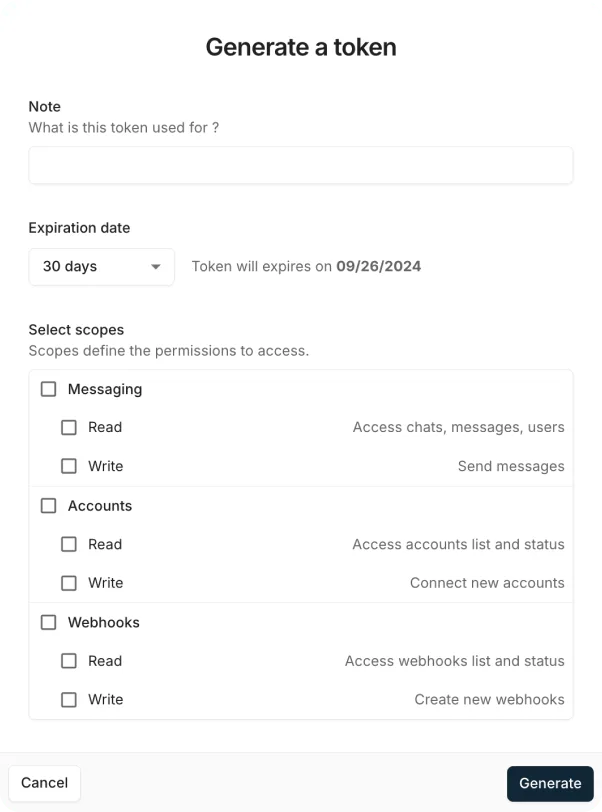
5. Connect LinkedIn Account
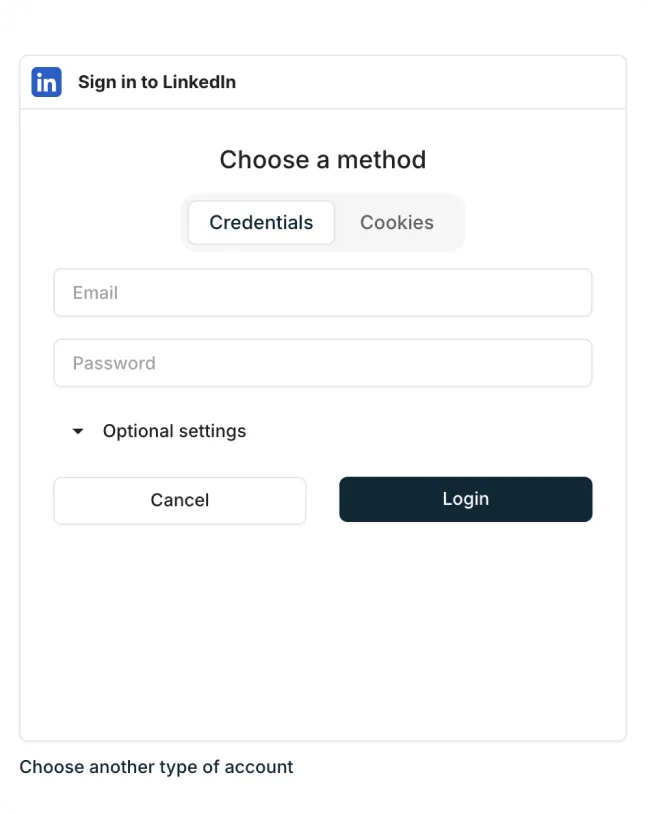
Developer Benefits of Implementing Linkedin API with Python


Integration and Technical Guidance
Streamline the integration of the LinkedIn API with detailed documentation and sample code examples. These tools are designed to simplify the setup process, quickly enhancing your platform’s communication capabilities.
Developer Support
Access our specialized support team for continuous assistance during the integration. This includes real-time troubleshooting and strategic advice from Unipile’s experts, ensuring optimal use of LinkedIn API.
Proactive Maintenance and Updates
Benefit from regular updates and proactive maintenance, keeping all LinkedIn API features aligned with the latest standards and feature enhancements from LinkedIn, thus ensuring seamless performance and minimal downtime.
FAQs
How do I connect to the LinkedIn API using Python?
Use Unipile’s accounts endpoint and provide credentials or cookie-based auth. You’ll receive a valid account ID.
Can I send LinkedIn messages with Python?
Yes. Use POST /chats with the recipient URN and your message content.
What are the main endpoints available via Unipile’s API?
Messages, profiles, posts, invitations, search, recruiter pipeline, and more.
How does Unipile compare to the official LinkedIn Partner Program?
It’s faster, more flexible, and requires no approval. Plus, it integrates other channels.
How do I integrate LinkedIn with my CRM using Python?
Use Unipile endpoints to retrieve profile data, and manage communication workflows directly from your app.


