
 LinkedIn
 Instagram
 WhatsApp
 Telegram
 Gmail
Gmail Outlook
 Google Calendar
 Join Slack Community
Introducing to MCP and LinkedIn API
The Message Control Protocol (MCP) provides a universal and open standard for establishing persistent connections between AI-driven systems and diverse data sources. By replacing heterogeneous integrations with a unified interface, MCP significantly simplifies how artificial intelligence accesses and processes LinkedIn API data, ensuring greater efficiency, scalability, and compliance.
For software engineers and developers working on CRM, ATS, and outreach automation, MCP streamlines messaging workflows, reduces API bottlenecks, and improves scalability. This guide provides an in-depth exploration of MCP’s impact on LinkedIn API, detailing core functionalities, integration methodologies, and how Unipile’s API simplifies implementation.
What is the LinkedIn API?

The LinkedIn API enables editors to simplify user interactions with the platform by automating tasks that would otherwise be manual and time-consuming. By integrating the API, businesses and developers can optimize their workflows and enhance their professional networking strategies. If you are still choosing a provider, we compare the options in our best LinkedIn API guide.
LinkedIn Integration Guide
Key Benefits of MCP Integration with LinkedIn API
LinkedIn MCP API: a term for API management by unifying multiple endpoints into a single control system. This reduces integration complexity and ensures that messages are consistently tracked across LinkedIn, email services, and other communication tools. By streamlining these processes, developers can build more efficient and scalable applications that interact seamlessly with LinkedIn’s ecosystem.
Security and regulatory compliance are also significantly enhanced through MCP’s implementation. With robust authentication and token management, MCP guarantees secure access to LinkedIn’s API, protecting sensitive data from unauthorized access.
Another key advantage of MCP is its contribution to high-performance API infrastructure. By intelligently distributing API loads, MCP maintains system efficiency. It also supports bulk request processing, allowing developers to execute large-scale API operations while staying within LinkedIn’s API limitations. This makes MCP particularly valuable for applications that require frequent interactions with LinkedIn’s platform, such as CRM systems, ATS solutions, and AI-driven outreach tools.
Unified API Control Across Channels
LinkedIn MCP API offers a streamlined approach to managing multiple API endpoints within a single system, eliminating the need for fragmented integrations. By leveraging this protocol, businesses can unify communication across various platforms, including LinkedIn, WhatsApp, Telegram, Instagram, X (formerly Twitter), Facebook Messenger, and email services such as Gmail and Microsoft Outlook.
Unipile MCP Server: Unified Multi-Channel Messaging API
curl --request POST \
     --url https://{YOUR_DSN}/api/v1/chats/9f9uio56sopa456s/messages \
     --header 'X-API-KEY: {YOUR_ACCESS_TOKEN}' \
     --header 'accept: application/json' \
     --header 'content-type: multipart/form-data' \
     --form 'text=Hello world !'
curl --request GET \
     --url https://{YOUR_DSN}/api/v1/chats/{CHAT_ID}/messages \
     --header 'X-API-KEY: {YOUR_ACCESS_TOKEN}' \
     --header 'accept: application/json'
What is Unipile MCP Server?
The MCP Server enables seamless integration with Unipile, allowing AI-powered applications to access and interact with messages from multiple communication platforms. Through a standardized interface, Unipile provides centralized messaging management across:
- LinkedIn – Automate interactions and manage professional connections.
- WhatsApp & Telegram – Send and receive messages while handling conversations effortlessly.
- Instagram, Messenger, and X – Engage with audiences directly.
- Emails – List, send and retrieve emails easily.
By leveraging Unipile’s unified API, CRM, ATS, and outreach solutions—can simplify multi-channel communication integration without dealing API complexities.
Unipile API for MCP-LinkedIn API Integration
Why Choose Unipile for MCP Integration?
One API for All Communication Channels
Unipile consolidates multiple messaging platforms into a single API endpoint, reducing development complexity.
Fast & Hassle-Free Integration
Unipile’s pre-built multi-channel messaging API minimizes time-to-market, allowing SaaS providers to focus on their core functionalities.
Enterprise-Grade Security & Reliability
With GDPR compliance, end-to-end encryption, and high availability, Unipile ensures secure and scalable messaging infrastructure.
Key Features of Unipile’s LinkedIn API Integration
-
Automated message dispatch & tracking.
-
API-based multi-channel outreach synchronization.
-
Webhook-enabled response monitoring for enhanced campaign management.
Authenticating LinkedIn API with Unipile
Setting Up Authentication
To retrieve LinkedIn data, authentication is required via Unipile Dashboard, which simplifies the process through secure token exchange.
import { UnipileClient } from "unipile-node-sdk";

const BASE_URL = "your_base_url";
const ACCESS_TOKEN = "your_access_token";

try {
    const client = new UnipileClient(BASE_URL, ACCESS_TOKEN);
    const response = await client.account.connect({
        provider: "LINKEDIN",
        username: "your_linkedin_username",
        password: "your_linkedin_password",
    });

    console.log(response);
} catch (error) {
    console.log(error);
}
Managing Access Tokens
Token Refresh & Expiry Handling
– Access tokens must be refreshed at regular intervals to maintain a secure and active connection.
– Unipile automatically manages token expiration, ensuring uninterrupted access without requiring manual intervention.
By leveraging Unipile’s automated token renewal, developers can focus on building advanced LinkedIn integrations without handling authentication complexities.
Real-World Use Cases for MCP & LinkedIn API
CRM & Sales Intelligence Automation

MCP integrates LinkedIn messaging within CRM platforms, streamlining lead management.
It enables automated LinkedIn follow-ups based on CRM event triggers.
Learn more about CRM Uses Case.
AI-Powered Talent Acquisition in ATS
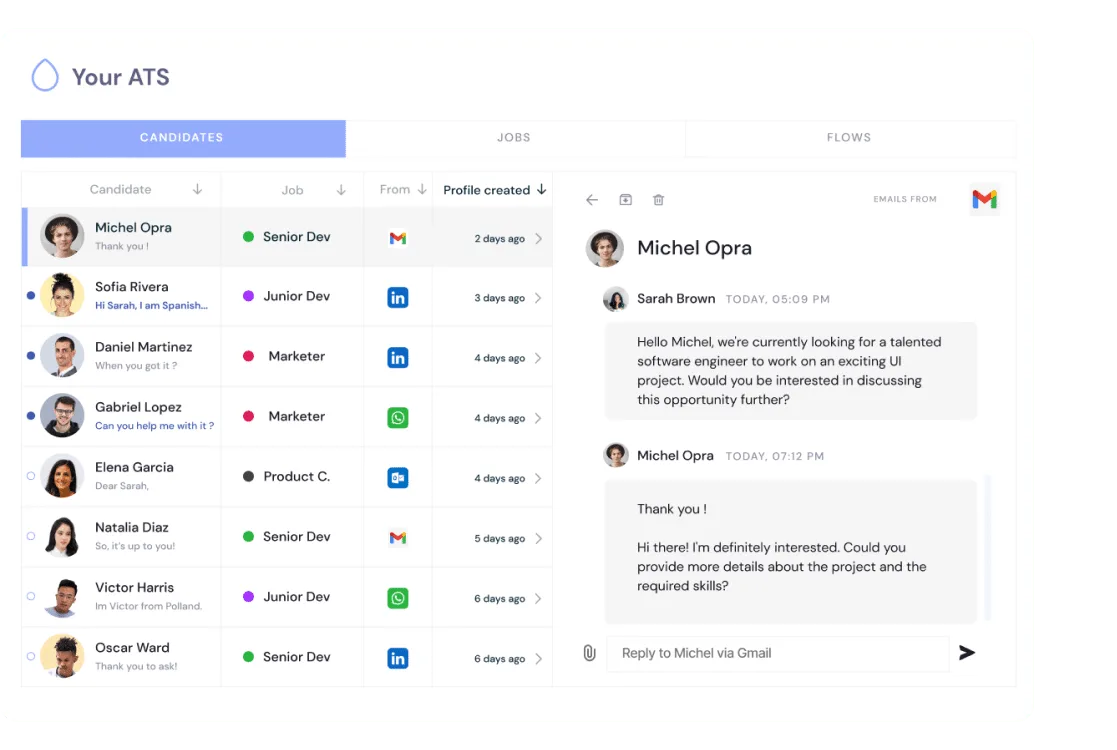
Synchronizes candidate conversations between ATS systems and LinkedIn Recruiter.
Automates candidate messaging sequences and profile enrichment.
AI-Powered Talent Acquisition in ATS

MCP enhances AI-driven outreach on LinkedIn by providing a structured framework for managing automated messaging workflows. By integrating AI agents with the LinkedIn API through MCP, software applications can streamline personalized outreach, ensuring that communications are timely and contextually relevant. These AI agents can analyze audience segments, automate follow-ups, and refine messaging strategies based on real-time engagement data.
Analytics & Performance for LinkedIn MCP API
With Unipile’s MCP Server, software publishers can offer advanced analytics to their users, providing valuable insights into multi-platform messaging activities. This enables real-time tracking and optimization of communication strategies.

Key Metrics Available
Message Delivery & Response Rates – Monitor read rates, response times, and engagement across LinkedIn, WhatsApp, Slack, and other messaging platforms.
Interaction Insights – Analyze conversation frequency, response efficiency, and user engagement trends to optimize outreach performance.
Cross-Platform Communication Trends – Aggregate data from multiple channels to refine messaging strategies and improve campaign effectiveness.
Managing Multi-Platform Limits with Unipile MCP Server
Each messaging platform enforces specific usage constraints to ensure system integrity. Unipile’s MCP Server helps manage these limitations efficiently, preventing disruptions and ensuring compliance with platform guidelines.
Optimizing Messaging Quotas:
- Outbound Message Limits – Platforms like LinkedIn and WhatsApp impose restrictions on daily message volume. MCP Server automates message pacing to prevent overuse and optimize deliverability.
- Connection & Invitation Management – MCP Server dynamically adjusts connection request frequencies, ensuring accounts remain within safe operational thresholds.
- Profile & Conversation Retrieval – Accessing profile data and historical chats is regulated by each platform. Unipile’s API ensures data requests stay within recommended limits, preventing account restrictions.
Unipile MCP Server & LinkedIn API: Unified Messaging & Integration Capabilities
| Features |
LinkedIn
|
|---|---|
| Account connection | |
| Hosted Auth: White label to connect your end users |  |
| Custom auth: connect user with credentials, cookies, your chrome extension | |
| Messages | |
| Send & Reply Messages | |
| Send an InMail | |
| List Messages, Chats & Attendees | |
| List Reactions | |
| Read Receipts | |
| Send Files attachments | |
| Receive Files attachments API | |
| Send Voice Notes | |
| Send Embed Video | |
| Users/Profiles | |
| Retrieve a Profile | |
| Retrieve & Edit own profile | |
| List all relations & Followers | |
| List all Invitations Sent & Received | |
| Handle & Cancel a received Invitation |
|
| Send an Invitation |
|
| Cancel an Invitation |
|
| List all posts, comments, reactions |
|
| Posts | |
| Retrieve & Create a post |
|
| List all comments from a post |
|
| List all posts, comments, reactions |
|
| Comment a post |
|
| List all reactions from a post |
|
| Add a reaction to a post, comment |
|
| Webhooks | |
| Account status | |
| New Message | |
| New Reaction / Read / Event | |
| Specific | |
| Retrieve Recruiter hiring projects | |
| Perform an action with a user profile | |
| Retrieve a company profile |
|
| Get raw data from any endpoint (Inbox Search, Following someone, Get own profile viewers, Social Selling Index, Retrieve posts from Feed) | |
| Get inmail credit balance | |
| Retrieve LinkedIn search parameters |
|
| Perform Linkedin search | |
| List all job postings | |
| Create a job posting |
|
| Get job posting | |
| Publish a job posting | |
| Solve a job publishing checkpoint | |
| Close a job posting | |
| List all applicants to a job posting |
|
| Get a specific applicant to a job posting |
|
| Download the resume of a job applicant |
|
| Endorse a user profile specific skill |
|
| Webhooks | |
| Account status | |
| New Message | |
| New Reaction / Read / Event | |
| Inboxes | |
| LinkedIn Classic Inbox | |
| Sales Navigator Inbox | |
| LinkedIn Recruiter Inbox | |
| LinkedIn Company Page | |

LinkedIn Features
| Features |
LinkedIn
|
|---|---|
| Account connection | |
| Hosted Auth: White label to connect your end users | |
| Custom auth: connect user with credentials, cookies, your chrome extension | |
| Messages | |
| Send & Reply Messages | |
| Send an InMail | |
| List Messages, Chats & Attendees | |
| List Reactions | |
| Read Receipts | |
| Send Files attachments | |
| Receive Files attachments API | |
| Send Voice Notes | |
| Send Embed Video | |
| Users/Profiles | |
| Retrieve a Profile | |
| Retrieve & Edit own profile | |
| List all relations & Followers | |
| List all Invitations Sent & Received | |
| Handle & Cancel a received Invitation |
|
| Send an Invitation |
|
| Cancel an Invitation |
|
| List all posts, comments, reactions |
|
| Posts | |
| Retrieve & Create a post |
|
| List all comments from a post |
|
| List all posts, comments, reactions |
|
| Comment a post |
|
| List all reactions from a post |
|
| Add a reaction to a post, comment |
|
| Webhooks | |
| Account status | |
| New Message | |
| New Reaction / Read / Event | |
| Specific | |
| Retrieve Recruiter hiring projects | |
| Perform an action with a user profile | |
| Retrieve a company profile |
|
| Get raw data from any endpoint (Inbox Search, Following someone, Get own profile viewers, Social Selling Index, Retrieve posts from Feed) | |
| Get inmail credit balance | |
| Retrieve LinkedIn search parameters |
|
| Perform Linkedin search | |
| List all job postings | |
| Create a job posting |
|
| Get job posting | |
| Publish a job posting | |
| Solve a job publishing checkpoint | |
| Close a job posting | |
| List all applicants to a job posting |
|
| Get a specific applicant to a job posting |
|
| Download the resume of a job applicant |
|
| Endorse a user profile specific skill |
|
| Webhooks | |
| Account status | |
| New Message | |
| New Reaction / Read / Event | |
| Inboxes | |
| LinkedIn Classic Inbox | |
| Sales Navigator Inbox | |
| LinkedIn Recruiter Inbox | |
| LinkedIn Company Page | |
Unipile MCP Server: Developer Benefits & Integration Support


Dedicated Assistance During Integration
Our support team is with you every step of the way—before, during, and after integration—to ensure a seamless experience. We’re here to provide real-time assistance, helping you avoid any hiccups and extra costs.
Comprehensive Developer Resources
Our API comes with detailed documentation and sample code to simplify integration. These resources are designed to enhance your application’s capabilities, making the process of sending LinkedIn invitations smoother and more efficient.
Ongoing Updates and Maintenance
With proactive updates and regular maintenance, our API remains aligned with LinkedIn’s latest standards and improvements, ensuring consistent performance and minimizing any potential downtime.
FAQs
What is the primary advantage of MCP for LinkedIn API?
MCP enables structured, rate-optimized messaging for multi-channel automation.
How does MCP prevent API rate limit violations?
MCP dynamically queues and schedules requests, ensuring LinkedIn’s limits are not exceeded.
Can MCP be applied to LinkedIn Sales Navigator and Recruiter?
Yes, MCP supports all LinkedIn API variants, including Sales Navigator, Recruiter, and Classic LinkedIn.
Why integrate Unipile’s API with MCP?
Unipile offers a ready-to-use, scalable API that simplifies LinkedIn automation using MCP principles.
Can MCP be used for AI-powered LinkedIn engagement?
Absolutely. MCP provides the infrastructure for AI-driven LinkedIn messaging and workflow automation.


