
 Instagram
 WhatsApp
 Telegram
 Gmail
Gmail Outlook
 Google Calendar
 Join Slack Community
What is LinkedIn Profile Extraction Automation?
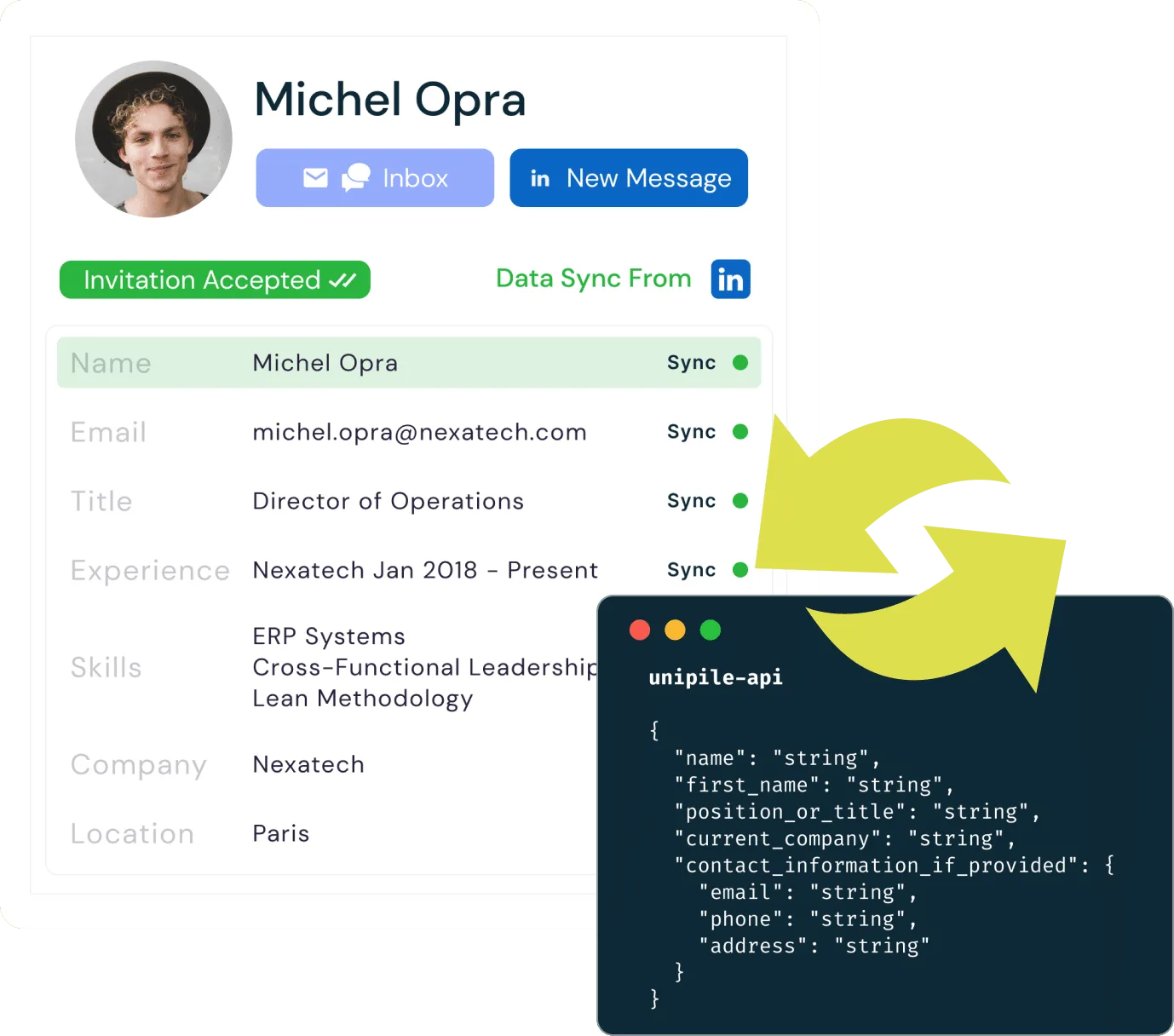
LinkedIn profile extraction refers to the process of programmatically retrieving profile information, such as names, job titles, companies, and skills, from LinkedIn, on behalf of authenticated users. Automation in this context means building workflows that retrieve this data through each user’s connected account, without requiring manual input from your team.

Unipile does not build or maintain any independent database of LinkedIn profile data for its own purposes. Any profile information handled through the service is processed only at the request of the authenticated user, and only to the extent technically necessary to support the requested workflow.
Why Automate LinkedIn Profile Extraction and Enrichment?
Automation is crucial for LinkedIn profile extraction and enrichment because it optimizes efficiency, accuracy, and data consistency. Manual processes are time-consuming and error-prone, especially when managing large volumes of user-initiated requests. For software editors and solution providers, automation offers distinct benefits:
- Time-Saving: Automating the retrieval process allows quick access to profile data across many users, reducing operational time and costs.
- Data Accuracy: Structured API workflows ensure consistent data quality, reducing errors.
- Enhanced Functionality: Integration with APIs and third-party systems allows enriched data to support advanced functionalities such as user profiling, analytics, and personalized communication.
Automation is particularly advantageous for companies focused on recruiting, lead generation, and market research, where timely access to relevant professional data can be a game-changer. Moreover, automation allows software providers to deliver scalable, compliant solutions that adapt to the evolving needs of their clients.
Use Cases for LinkedIn Profile Extraction and Enrichment
LinkedIn data extraction and enrichment have a broad spectrum of applications across different business domains. Some of the key use cases include:
Recruiting and Talent Acquisition
For recruiters, having access to enriched LinkedIn profiles can streamline the hiring process significantly. By accessing LinkedIn profiles through authenticated user accounts, recruiters can build a database of potential candidates with relevant skills and qualifications. Enrichment helps by adding additional context, such as endorsements, certifications, or social activity, which can be used to assess cultural fit and professional expertise.
Sales and Lead Generation
In the realm of sales and marketing, enriched LinkedIn profiles are invaluable for generating high-quality leads. Sales teams can use enriched data to identify key decision-makers, understand their career trajectory, and tailor outreach strategies accordingly. API-connected workflows can retrieve relevant profile data in real-time, providing sales professionals with a competitive edge.
Key Components of LinkedIn Profile Extraction Automation
Data Points Available in a LinkedIn Profile
With Unipile’s API, your application can access comprehensive LinkedIn profile data on behalf of each authenticated user, such as:
- Basic Information: Name, job title, company, and contact details.
- Professional Experience: Job roles, tenure, and company affiliations.
- Educational Background: Degrees and certifications.
- Social and Professional Activity: Posts, comments, and connections.
This enriched data allows businesses to understand user profiles better and optimize interactions.

Tools and Technologies for LinkedIn Data Extraction

Unipile offers a Messaging API that enables your application to access LinkedIn data on behalf of each connected user, as well as other platforms like WhatsApp and Instagram. Using the API, each user can:
- Access detailed profiles, company data, and connection relationships.
- Perform searches across LinkedIn Classic, Sales Navigator, and Recruiter.
- Access metrics like engagement levels, follower counts, and professional activity.
The API ensures smooth integration with your application, providing up-to-date and comprehensive user data for better decision-making.
Unipile acts as an independent technical intermediary. We are not affiliated with, endorsed by, or sponsored by LinkedIn. Every action executed through our API is initiated by, and performed on behalf of, an authenticated user who has explicitly connected their own LinkedIn account to your application. The scope of each action is strictly limited to what that user could otherwise access manually from their own LinkedIn session. No privileged endpoints, no cross-account access, no data collection outside of the workflows the user has initiated.
Enrichment Strategies for LinkedIn Data
What is Data Enrichment?
Data enrichment refers to the process of enhancing raw LinkedIn profile data by adding additional context or missing information. This can involve incorporating new data points such as contact details or social activity, making the data more comprehensive and actionable. Enriched profiles provide deeper insights into an individual’s professional background, helping businesses improve engagement, targeting, and decision-making processes.
Types of Enrichment for LinkedIn Profiles

Data enrichment strategies aim to provide a more detailed and actionable view of user profiles. The types of enrichment offered can be visualized through features like:
- Data Profile Enrichment: Integrates name, email, title, and experience into a comprehensive data profile, ensuring up-to-date information.
- Invitations Status: Tracks and synchronizes the status of LinkedIn invitations, providing insights into accepted, pending, and declined connections.
- Posts Reactions: Collects and enriches data on user interactions with posts, enabling better understanding of content impact and user engagement.
These features empower recruiters, marketers, and sales teams to enhance engagement and improve decision-making.
Effective Sequence Planning for Search Data Extraction
Effective Sequence Planning for Search Data Extraction

When automating LinkedIn workflows, creating structured sequences is essential for managing activities like searches, invitations, and messaging. For instance, you can schedule search sequences on Sales Navigator or Recruiter to retrieve profiles based on specific criteria, through each user’s authenticated session, such as job titles or company names. Follow this by setting up invitation workflows with InMail to reach out to potential leads or candidates. Finally, integrate message sequences to send personalized follow-ups, ensuring consistent engagement while adhering to LinkedIn’s usage limits.

LinkedIn Rate Limits and Error Management
Using a scheduling system, you can execute up to 1,000 searches or 80 invitations per day while maintaining compliance. Such automation enables a more effective and organized approach to profile data retrieval, ensuring profiles are enriched with relevant details such as job titles, professional activities, and contact information, all while optimizing engagement workflows.
This systematic method maximizes efficiency and boosts engagement outcomes.
Unipile emphasises adherence to LinkedIn’s terms and conditions. Because third-party platform rules and availability may change over time, customers are responsible for configuring their use of the service in a way that is appropriate for their use case and aligned with applicable third-party terms. Built-in rate-limit signals and informative headers help your application adapt its cadence in real time, within the limits applicable to each authenticated user account.
Optimizing LinkedIn profile extraction with API Integration

Optimizing data retrieval is key for developers working with LinkedIn and other platforms. By leveraging efficient API-based retrieval methods, you can streamline data access across multiple sources, making your applications more robust and user-friendly. Start refining your user management processes today. Learn how to integrate LinkedIn API with the Unipile Guide.
Explore LinkedIn Capabilities with Unipile’s API Integration
| Features |
LinkedIn
|
|---|---|
| Account connection | |
| Hosted Auth: White label to connect your end users |  |
| Custom auth: connect user with credentials, cookies, your chrome extension | |
| Messages | |
| Send & Reply Messages | |
| Send an InMail | |
| List Messages, Chats & Attendees | |
| List Reactions | |
| Read Receipts | |
| Send Files attachments | |
| Receive Files attachments API | |
| Send Voice Notes | |
| Send Embed Video | |
| Users/Profiles | |
| Retrieve a Profile | |
| Retrieve & Edit own profile | |
| List all relations & Followers | |
| List all Invitations Sent & Received | |
| Handle & Cancel a received Invitation |
|
| Send an Invitation |
|
| Cancel an Invitation |
|
| List all posts, comments, reactions |
|
| Posts | |
| Retrieve & Create a post |
|
| List all comments from a post |
|
| List all posts, comments, reactions |
|
| Comment a post |
|
| List all reactions from a post |
|
| Add a reaction to a post, comment |
|
| Webhooks | |
| Account status | |
| New Message | |
| New Reaction / Read / Event | |
| Specific | |
| Retrieve Recruiter hiring projects | |
| Perform an action with a user profile | |
| Retrieve a company profile |
|
| Get raw data from any endpoint (Inbox Search, Following someone, Get own profile viewers, Social Selling Index, Retrieve posts from Feed) | |
| Get inmail credit balance | |
| Retrieve LinkedIn search parameters |
|
| Perform Linkedin search | |
| List all job postings | |
| Create a job posting |
|
| Get job posting | |
| Publish a job posting | |
| Solve a job publishing checkpoint | |
| Close a job posting | |
| List all applicants to a job posting |
|
| Get a specific applicant to a job posting |
|
| Download the resume of a job applicant |
|
| Endorse a user profile specific skill |
|
| Webhooks | |
| Account status | |
| New Message | |
| New Reaction / Read / Event | |
| Inboxes | |
| LinkedIn Classic Inbox | |
| Sales Navigator Inbox | |
| LinkedIn Recruiter Inbox | |
| LinkedIn Company Page | |


Account Connection
2 endpoints available
Messages
10 endpoints available
Users/Profiles
8 endpoints available
Posts/Comments
6 endpoints available
Specific
17 endpoints available
Webhooks
3 events available
Inboxes
4 inboxes available
Developer Advantages of the LinkedIn Data API


Dedicated Support Throughout Integration
Our committed support team is ready to assist you at every step—before, during, and after the integration process. They provide real-time help to ensure seamless integration without incurring additional costs.
Developer Support
Efficiently integrate the LinkedIn Invite API using our comprehensive documentation and sample code. These resources are tailored to simplify your integration effort and enhance your application’s capability to send invitations.
Consistent Updates and Maintenance
Benefit from ongoing updates and proactive maintenance with the LinkedIn Invite API. This keeps the API functioning smoothly, in line with LinkedIn’s latest standards and enhancements, thus minimizing downtime and boosting performance.
FAQs
What is LinkedIn Profile Extraction Automation?
LinkedIn profile extraction automation involves using tools and APIs to programmatically collect profile data such as names, job titles, and skills without manual effort.
Why Automate LinkedIn Profile Extraction and Enrichment?
Automation increases efficiency, ensures data accuracy, and allows scalability, making it ideal for recruiting, lead generation, and market research.
What are the Benefits of Enriching LinkedIn Profiles?
Enriched profiles provide deeper insights by adding additional information like contact details and social activity, enhancing engagement strategies.
What Data Points Can Be Extracted from LinkedIn?
Extractable data includes basic info (name, title, company), experience, education, and social interactions such as posts and comments.
How Do API Integrations Facilitate LinkedIn Data Extraction?
APIs allow direct integration with platforms like LinkedIn to extract and manage data efficiently, ensuring real-time updates and smooth workflow automation.
What Are the Use Cases for LinkedIn Profile Extraction?
It is commonly used for recruiting, sales prospecting, and market analysis to build candidate databases, identify leads, and understand industry trends.
Is LinkedIn profile extraction via Unipile an official LinkedIn product?
No. Unipile is not affiliated with, endorsed by, or sponsored by LinkedIn. We operate as an independent technical intermediary that lets software publishers connect authenticated LinkedIn accounts to their application. Every profile read is executed on behalf of the user who owns the connected account, inside a workflow that user has explicitly initiated.
Does Unipile keep a database of the LinkedIn profiles it retrieves?
No. Unipile does not build or maintain any independent database of LinkedIn profile data for its own purposes. Profile information surfaced through the API is handled only on behalf of the authenticated user, at that user’s request, and only to the extent technically necessary for the workflow executed by your application.
What profile data can actually be retrieved, and under what scope?
The API exposes only the profile information that the authenticated user could themselves view from their own LinkedIn session. For example profiles visible in their network, in their connections, or in their Sales Navigator / Recruiter seat when applicable. There is no privileged backend access, no cross-account enrichment, and no scope beyond what the user’s own account is authorised to see.
How does Unipile ensure profile retrieval respects LinkedIn's usage policies?
Unipile relays LinkedIn’s own rate-limit signals and usage headers so your application can adapt its cadence in real time. Because platform rules evolve, customers remain responsible for configuring conservative workflows aligned with LinkedIn’s current terms and with the legitimate business needs of their end users. Our role is to give you the signals; the responsible orchestration stays on your side.


