
 LinkedIn
 Instagram
 WhatsApp
 Telegram
 Gmail
Gmail Outlook
 Google Calendar
 Join Slack Community
Send Invitation LinkedIn API
Unipile offers an API that simplifies the automation of LinkedIn invitations, enhancing networking efficiency. By leveraging Unipile’s LinkedIn API, users can seamlessly send LinkedIn invitations from your software, streamlining the process and ensuring effective outreach. This article delves into how to use Unipile’s API for sending LinkedIn invitations, providing insights into best practices, setup, and advanced techniques for an optimized user experience.
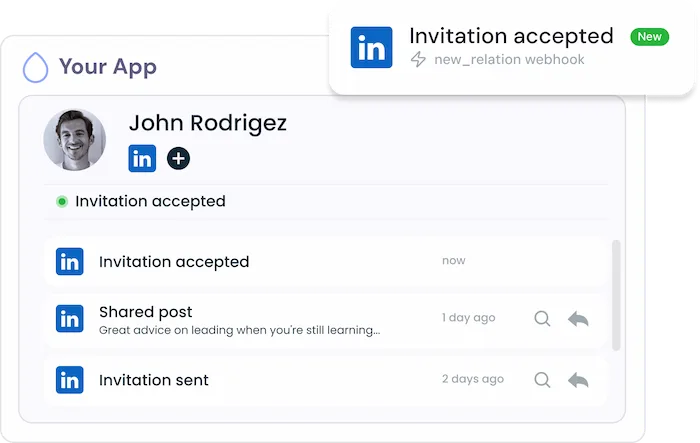
Send Invitation LinkedIn API

Unipile offers an API that simplifies the automation of LinkedIn invitations, enhancing networking efficiency. By leveraging Unipile’s API, users can seamlessly send LinkedIn invitations from your software, streamlining the process and ensuring effective outreach. This article delves into how to use Unipile’s API for sending LinkedIn invitations, providing insights into best practices, setup, and advanced techniques for optimized experience user.
How to Use LinkedIn API for Sending Invitations
The Send Invitation LinkedIn Messaging API provides developers with tools to integrate LinkedIn’s invitation-sending capabilities into their applications. This feature can greatly enhance your app’s networking functionality and user engagement.
const options = {
  method: 'POST',
  headers: {accept: 'application/json', 'content-type': 'application/json'}
};

fetch('https://api1.unipile.com:13111/api/v1/users/invite', options)
  .then(response => response.json())
  .then(response => console.log(response))
  .catch(err => console.error(err));
CURL *hnd = curl_easy_init();

curl_easy_setopt(hnd, CURLOPT_CUSTOMREQUEST, "POST");
curl_easy_setopt(hnd, CURLOPT_WRITEDATA, stdout);
curl_easy_setopt(hnd, CURLOPT_URL, "https://api1.unipile.com:13111/api/v1/users/invite");

struct curl_slist *headers = NULL;
headers = curl_slist_append(headers, "accept: application/json");
headers = curl_slist_append(headers, "content-type: application/json");
curl_easy_setopt(hnd, CURLOPT_HTTPHEADER, headers);

CURLcode ret = curl_easy_perform(hnd);

Direct Invitations via Contact Record
The Send Invitation LinkedIn API allows users to send direct connection invitations through contact records in their applications. This feature enhances networking by enabling seamless and efficient outreach, making interactions more engaging.
Invitation Automation Outreach
Effective communication hinges on personalization. The API allows users to automate tailored invitations based on recipient profiles, making outreach more relevant and engaging. This approach to invitation automation outreach results in higher acceptance rates and more meaningful connections.
Data and Analytics for Automation
Developers can track and analyze the performance of automated invitations. By monitoring delivery rates, acceptance rates, and response times, users gain insights to optimize their networking strategies and improve overall effectiveness.
Benefits of Automating LinkedIn Invitations
The Send Invitation LinkedIn API enhances professional networks by enabling users to automate reaching out to potential clients, partners, or candidates directly from their applications, fostering stronger relationships.

Learn how to integrate
Enhanced Network Building
The Send Invitation LinkedIn API enhances professional networks by enabling users to automate reaching out to potential clients, partners, or candidates directly from their applications, fostering stronger relationships.
Efficiency and Time Management
By automating invitation processes through the LinkedIn API, significant time savings are realized. This allows professionals to focus on high-priority tasks while maintaining consistent networking efforts without manual intervention.
Automated Invitations and Messaging
Beyond sending invitations, the LinkedIn API provides additional features such as sending direct messages and send InMail. These tools facilitate comprehensive communication strategies, allowing users to engage with their network more effectively within a single platform.
Explore LinkedIn Features with Unipile’s API Integration
| Features |
LinkedIn
|
|---|---|
| Account connection | |
| Hosted Auth: White label to connect your end users |  |
| Custom auth: connect user with credentials, cookies, your chrome extension | |
| Messages | |
| Send & Reply Messages | |
| Send an InMail | |
| List Messages, Chats & Attendees | |
| List Reactions | |
| Read Receipts | |
| Send Files attachments | |
| Receive Files attachments API | |
| Send Voice Notes | |
| Send Embed Video | |
| Users/Profiles | |
| Retrieve a Profile | |
| Retrieve & Edit own profile | |
| List all relations & Followers | |
| List all Invitations Sent & Received | |
| Handle & Cancel a received Invitation |
|
| Send an Invitation |
|
| Cancel an Invitation |
|
| List all posts, comments, reactions |
|
| Posts | |
| Retrieve & Create a post |
|
| List all comments from a post |
|
| List all posts, comments, reactions |
|
| Comment a post |
|
| List all reactions from a post |
|
| Add a reaction to a post, comment |
|
| Webhooks | |
| Account status | |
| New Message | |
| New Reaction / Read / Event | |
| Specific | |
| Retrieve Recruiter hiring projects | |
| Perform an action with a user profile | |
| Retrieve a company profile |
|
| Get raw data from any endpoint (Inbox Search, Following someone, Get own profile viewers, Social Selling Index, Retrieve posts from Feed) | |
| Get inmail credit balance | |
| Retrieve LinkedIn search parameters |
|
| Perform Linkedin search | |
| List all job postings | |
| Create a job posting |
|
| Get job posting | |
| Publish a job posting | |
| Solve a job publishing checkpoint | |
| Close a job posting | |
| List all applicants to a job posting |
|
| Get a specific applicant to a job posting |
|
| Download the resume of a job applicant |
|
| Endorse a user profile specific skill |
|
| Webhooks | |
| Account status | |
| New Message | |
| New Reaction / Read / Event | |
| Inboxes | |
| LinkedIn Classic Inbox | |
| Sales Navigator Inbox | |
| LinkedIn Recruiter Inbox | |
| LinkedIn Company Page | |
LinkedIn Features


Account Connection
Hosted Auth: White label to connect your end users
Custom auth: connect user with credentials, cookies, your chrome extension
Messages
Send & Reply Messages
Send an InMail
List Messages, Chats & Attendees
List Reactions
Read Receipts
Send Files attachments
Receive Files attachments API
Send Voice Notes
Send Embed Video
Users/Profiles
Retrieve a Profile
Retrieve & Edit own profile
List all relations & Followers
List all Invitations Sent & Received
Handle & Cancel a received Invitation
Send an Invitation
Cancel an Invitation
List all posts, comments, reactions
Posts
Retrieve & Create a post
List all comments from a post
List all posts, comments, reactions
Comment a post
List all reactions from a post
Add a reaction to a post, comment
Webhooks
Account status
New Message
New Reaction / Read / Event
Specific
Retrieve Recruiter hiring projects
Perform an action with a user profile
Retrieve a company profile
Get raw data from any endpoint (Inbox Search, Following someone, Get own profile viewers, Social Selling Index, Retrieve posts from Feed)
Get inmail credit balance
Retrieve LinkedIn search parameters
Perform Linkedin search
List all job postings
Create a job posting
Get job posting
Publish a job posting
Solve a job publishing checkpoint
Close a job posting
List all applicants to a job posting
Get a specific applicant to a job posting
Download the resume of a job applicant
Endorse a user profile specific skill
Inboxes
LinkedIn Classic Inbox
Sales Navigator Inbox
LinkedIn Recruiter Inbox
LinkedIn Company Page
Send Invitation LinkedIn API: Setup Instructions

Send Invitation API Integration
Integrating the Send Invitation LinkedIn API into your application requires an understanding of basic API principles. Unipile offers extensive documentation to guide developers through each step of the integration process.
Initial Setup
To send an invitation, use the POST /users/invite endpoint. Include recipient details in the request body. Detailed configuration for this feature, available here.
API Endpoint Usage
The API endpoint for sending invitations is essential. Below is a cURL command example showing how to send a POST request with the necessary headers and payload.
Configuration Guide
For detailed guidance on integrating and configuring the Send Message API, refer to Unipile’s comprehensive API documentation. This resource offers step-by-step instructions, best practices, and examples to help you implement the API effectively.
How to Integrate LinkedIn’s Send Invitation API with Unipile for Improved Security and Flexibility

Data Security and Privacy in Using LinkedIn’s Send Invitation API
LinkedIn’s Send Invitation API is engineered with top-tier security measures to safeguard data integrity and ensure privacy. It employs advanced encryption techniques and complies with stringent privacy laws to prevent unauthorized data use. Developers can integrate this API with confidence, as it aligns with LinkedIn’s operational standards and curtails activities that might lead to account suspension, thus ensuring regulatory compliance and risk reduction.
LinkedIn Invite API for ATS Integration
The integration of LinkedIn’s Send Invitation API with ATS systems transforms recruitment by automating connection invitations to potential candidates. This enhancement not only simplifies candidate engagement but also elevates the overall efficiency of the hiring process.
LinkedIn Invition via a CRM
By integrating the Send Invitation API from LinkedIn with existing CRM systems, businesses can automate sending connection requests directly through the CRM interface. This functionality centralizes customer interactions, enhancing communication and the management of leads and client relationships efficiently.
Outreach Enhancement: LinkedIn Invite API
Incorporating LinkedIn’s Send Invitation API into outreach software significantly boosts marketing and business development strategies by automating the process of sending connection requests. This integration ensures more effective engagement in marketing campaigns and business growth initiatives for your users.
Developer Advantages of the Invitation LinkedIn API


Dedicated Support Throughout Integration
Our committed support team is ready to assist you at every step—before, during, and after the integration process. They provide real-time help to ensure seamless integration without incurring additional costs.
Developer Support
Efficiently integrate the LinkedIn Invite API using our comprehensive documentation and sample code. These resources are tailored to simplify your integration effort and enhance your application’s capability to send invitations.
Consistent Updates and Maintenance
Benefit from ongoing updates and proactive maintenance with the LinkedIn Invite API. This keeps the API functioning smoothly, in line with LinkedIn’s latest standards and enhancements, thus minimizing downtime and boosting performance.
FAQs
What is the LinkedIn Invitation API?
The LinkedIn Invite API allows developers to programmatically send connection invitations to LinkedIn users. This can be used to enhance networking capabilities within various applications such as ATS, CRM, and outreach software.
How can I access the LinkedIn Invite API?
To access the LinkedIn Invite API, you need to have a Unipile account. You can test it for free for a 7 Day-Trial.
What are the main benefits of integrating the LinkedIn Invite API into my application?
Integrating the LinkedIn Invite API enhances your application by automating connection requests, streamlining networking processes, improving user engagement, and expanding professional networks efficiently.
Is there any cost associated with using the LinkedIn Invite API?
With the Unipile LinkedIn API, you can access all features at the same price, depending on the number of accounts. Consult the pricing details here.
What types of applications typically benefit from the LinkedIn Invite API?
Applications such as Applicant Tracking Systems (ATS), Customer Relationship Management (CRM) systems, and outreach or marketing platforms benefit greatly from the LinkedIn Invite API by automating and managing connection requests efficiently. Any other software can also integrate this feature to meet their needs.
Can I customize the connection invitations sent via the LinkedIn Invite API?
Yes, the LinkedIn Invite API allows for customization of connection requests, including personalized messages. This can help tailor invitations to be more engaging and relevant to the recipients.
What support is available during the integration process of the LinkedIn Invite API?
Unipile provides comprehensive documentation, code samples, and access to support teams. Additionally, Unipile offers integration calls with their founders and ongoing live support to assist with any issues during the integration process.


