
 LinkedIn
 WhatsApp
 Telegram
 Gmail
Gmail Outlook
 Google Calendar
 Join Slack Community
DMA
Our solution is built in line with the Digital Markets Act (DMA). User profiles are never stored or scraped, and our API focuses exclusively on enabling messaging interoperability. Clients are expected to comply with the terms of each provider.
Introduction
What is Instagram api?
Key Components of Instagram API
Instagram API for Software Publishers
Instagram's Official API Documentation
Instagram API Integration
Unipile vs Meta APIs
Integrate Instagram API with Unipile
Instagram API Features
Integration Support and Resources
FAQs
Understanding Instagram API Documentation
Instagram has evolved into a critical communication platform not just for personal use, but also for business and professional interactions. For software publishers, especially those creating CRM, ATS, or outreach solutions, mastering Instagram API documentation is no longer optional, it’s essential. This guide walks you through everything you need to know to unlock Instagram’s powerful capabilities through Unipile’s unified API. By the end, you’ll have the tools and confidence to integrate Instagram into your software quickly and securely.
What is Instagram API?

The Instagram API provides developers with the ability to manage messaging programmatically. Instead of switching apps, your product can sync and process Instagram DMs in real time. Whether for a CRM, ATS, or outreach tool, the API documentation guides you to send, receive, and organize conversations, enabling richer engagement and seamless communication flows for your users.

Key Components of Instagram’s API Documentation
-
Authentication Protocols (OAuth 2.0)
-
Permissions and Scopes
-
Endpoints (Profile, Media, Comments)
-
Rate Limits and Throttling
-
Pagination and Filtering Methods
Each section of the Instagram API documentation provides best practices, warnings, examples, and sample requests to guide developers toward building stable and scalable integrations.
Differences Between Basic and Graph API
The Basic API is deprecated. Today, the Instagram Graph API is the standard. It’s built for professional accounts (Business or Creator) and provides better control, especially for messaging and marketing purposes. The shift reflects Instagram’s focus on business use cases, insights, and structured marketing activities, all through secure and scalable methods.
Why Instagram API Matters for Software Publishers
Use Cases for CRM, ATS Editors
CRM and ATS companies increasingly need direct social media messaging features. Instagram API documentation empowers you to:
-
Respond instantly to DMs
-
Centralize candidate or client conversations inside your platform
Expanding Communication Channels with Instagram API
Instagram is no longer optional. 80% of users follow at least one business on the platform. By integrating Instagram messaging directly into your SaaS product, you:
-
Increase app stickiness
-
Differentiate from competitors
-
Drive better adoption and higher retention rates
Navigating Instagram’s Official API Documentation
Instagram’s API documentation is a comprehensive resource designed to help developers connect their apps to Instagram’s platform efficiently and securely. It explains every aspect of the integration process, from authentication with OAuth 2.0 to managing permissions, handling rate limits, and accessing key endpoints for media and messaging. A solid understanding of this documentation is essential for any serious CRM, ATS, or outreach publisher aiming to embed Instagram functionalities directly into their software. You can explore the full official documentation here to get deeper insights into how to build stable, scalable integrations.
Authentication: OAuth 2.0 Basics
Before accessing any Instagram data, apps must authenticate users via OAuth 2.0. This includes:
- Requesting authorization
- Receiving an authorization code
- Exchanging it for an access token
- Managing token refresh for long-term access
Unipile simplifies this by offering hosted authentication flows, eliminating most manual steps.
Permissions and Scopes You Must Understand
Each API call requires specific permissions. Some critical scopes include:
-
instagram_basic (basic profile information)
-
instagram_manage_messages (manage Instagram messaging)
-
pages_messaging (send and receive messages on behalf of pages)
Missing or wrongly configured scopes typically result in access errors, making scope management critical
Rate Limits and How to Handle Them
The Instagram API enforces strict rate limits to prevent abuse. To handle them gracefully:
- Batch your requests
- Implement efficient caching
- Respect pagination limits
- Apply backoff strategies when limits are hit
Following these practices ensures a smoother user experience and API compliance.
How Unipile Enhances Instagram API Integration
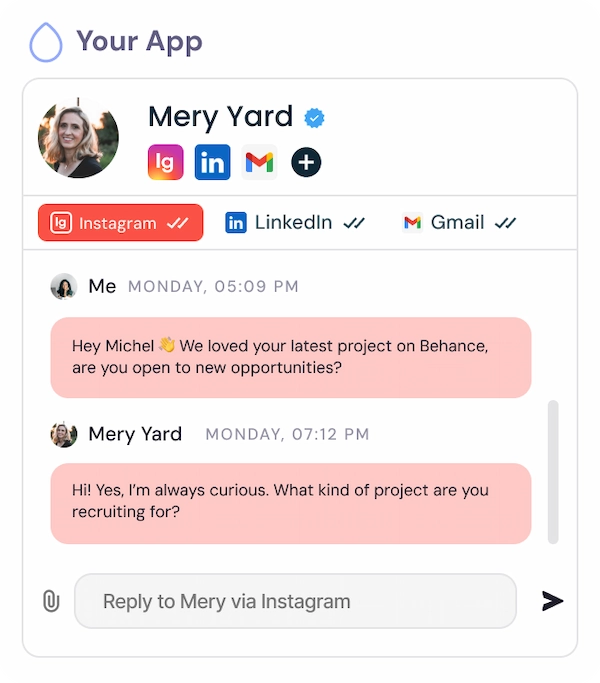
Unified Access: Instagram, WhatsApp, LinkedIn, and Email in One API
Instead of juggling multiple APIs and SDKs, Unipile offers One API to manage Instagram alongside other major communication channels. This reduces complexity, shortens development time, and lowers maintenance costs.
Simplified Authentication with Hosted and Custom Auth
Forget about coding complex OAuth 2.0 flows from scratch. Unipile’s hosted auth manages the entire connection process securely, whether it’s for Instagram, LinkedIn, Gmail, Outlook, or WhatsApp. Alternatively, you can build custom authentication if needed for white-label experiences.
Unipile vs Meta APIs: A Clear Advantage for Fast, Full Instagram Integration
Choosing the right API platform can dramatically impact your speed to market, development effort, and maintenance overhead. Traditional Meta APIs require weeks or even months of integration work, along with manual maintenance and limited feature access after long approval processes. In contrast, Unipile’s unified API lets you integrate Instagram, WhatsApp, LinkedIn, and more in just 2–3 days. With low development effort (REST + SDKs), fully managed maintenance, instant full-feature access, and a dedicated tech support team, Unipile accelerates your roadmap while boosting your application’s reliability and scalability.
| Criteria | Meta APIs | Unipile |
|---|---|---|
| Time to integrate | Weeks or months | 2–3 days |
| Dev effort | High | Low (REST + SDKs) |
| Maintenance | Manual | Fully managed |
| Access to features | Partial (after approval) | Full, instantly |
| Support | Self-service only | Dedicated tech team |
| Criteria | Meta APIs | Unipile |
|---|---|---|
| Time to integrate | Weeks/months | 2–3 days |
| Dev effort | High | Low (REST + SDKs) |
| Maintenance | Manual | Fully managed |
| Access to features | Partial (after approval) | Full, now |
| Support | Self-service only | Dedicated tech team |
Practical Steps to Integrate Instagram API Using Unipile
Integrating Instagram features within your software can seem complex without the right guide. Thanks to Unipile, the entire process becomes intuitive, fast, and fully manageable within a few steps. In this section, we’ll show you exactly how to connect Instagram accounts securely and start interacting with profiles, messages, and posts through a single unified API.
Sign Up to Unipile

Log to Dashboard
Access your workspace and manage your connected accounts.

Retrieving your Instagram credentials
To perform an authentication for Instagram, a user need its INSTAGRAM username and password. Authentication via Facebook credentials is not supported at the moment.
Authentication
Make a POST request to this Unipile API endpoint or use the appropriate SDK Method.
curl --request POST
     --url https://{YOUR_DSN}/api/v1/accounts
     --header 'X-API-KEY: {YOUR_ACCESS_TOKEN}'
     --header 'accept: application/json'
     --header 'content-type: application/json'
     --data '
{
  "provider": "INSTAGRAM",
  "username": "unipile",
  "password": "********"
}
'
Handle 2FA checkpoint
If an Instagram account has the two-factor authentication activated, you will encounter a checkpoint through a 202 status. Here’s an example of a checkpoint response.
{
  "object": "Checkpoint",
  "account_id": "098dez89d",
  "checkpoint": {
    "type": "2FA"
  }
}
In this case, a new Authentication Intent starts. This intent last 5 minutes and checkpoints must be solved in this time frame.
Solve 2FA checkpoint
To solve the 2FA checkpoint, make a POST request to the Unipile API using the Solve checkpoint endpoint or use an SDK Method by giving the account_id returned by the first request.
curl --request POST
     --url https://{YOUR_DSN}/api/v1/accounts/checkpoint
     --header 'X-API-KEY: {YOUR_ACCESS_TOKEN}'
     --header 'accept: application/json'
     --header 'content-type: application/json'
     --data '
{
  "provider": "INSTAGRAM",
  "account_id": "098dez89d",
  "code": "******"
}
'
Handle Intent Timeout
If the user takes more than 5 minutes to solve the checkpoint, the account will not be connected. Any subsequent request to solve a checkpoint outside a 5 minutes time frame will first respond a 408 – Request Timeout, then a 400 – Bad Request as the Authentication Intent will self destroy.
Using API Endpoints for Messaging and Profile Management
Example actions available via API:
🟢 Send a direct message: /api/v1/messages
🟢 List recent conversations
Full reference available in the Unipile developer docs
Instagram API Documentation: Available Features via Unipile’s Unified API
Instagram Features


Account connection
Hosted Auth: White label to connect your end users
Custom auth: connect user with credentials, cookies, your chrome extension
Messages
Send & Reply Messages
List Messages, Chats & Attendees
Sync History
List Reactions
Read Receipts
Send Files attachments
Receive Files attachments
Webhooks
Account status
New Message
New Reaction / Read / Event
What You Can Build with Instagram API Documentation: Chats and Multi-Channel Sequences

List Instagram Chats via API in Real-Time

curl --request GET
     --url https://api1.unipile.com:13111/api/v1/chats
     --header 'accept: application/json'
With just one call from the Instagram API documentation, you can fetch and display all active Instagram conversations inside your app. Ideal for CRM, ATS, and support platforms, Unipile allows your users to centralize their inbox, alongside LinkedIn, WhatsApp, and Gmail, for seamless multi-channel communication.
Build Advanced Sequences with Instagram API Documentation
With the Instagram Messaging API, you can design automated sequences that keep conversations active and personalized. For example, a new lead can receive a welcome DM, followed by a reminder a few days later, and then a handoff to a sales rep if they reply. Recruiters can schedule follow-ups with candidates, while support teams can assign messages to teammates for faster resolution.
These sequences allow your users to create consistent communication flows directly inside your CRM or ATS, without switching platforms. By combining real-time DMs with structured workflows, Instagram messaging becomes a powerful driver of engagement and efficiency.
Use Cases: Integrate Instagram Seamlessly in Your SaaS
CRM & Sales Software
Turn social interactions into business opportunities.
Instagram has become a key touchpoint in the sales cycle. With Unipile’s unified API, your users can engage directly within the CRM: reply to DMs, comment on posts, or trigger follow-up actions, all without leaving the platform.
ATS & Recruiting Platforms
Connect with candidates where they’re active.
Instagram is increasingly relevant for employer branding and passive sourcing. With Unipile, recruiters can instantly view and reply to Instagram messages, track engagement, and streamline outreach workflows, no manual copy-paste required.
Outreach & Multichannel Tools
Power intelligent sequences across social and messaging channels.
Give your users the tools to design multi-step campaigns mixing Instagram, LinkedIn, and email. Send messages, like posts, comment or track responses, all from your UI, all through one API.
Conclusion
Instagram API documentation is your gateway to building modern, social-first software products. With Unipile’s unified API approach, you can skip the complexity, ensure compliance, and launch faster. Whether you’re enhancing a CRM, ATS, or outreach platform, now is the time to bring Instagram communication inside your app experience, and Unipile is the best partner to make it happen.
Ready to start? Build now with Unipile and unlock the full power of Instagram, LinkedIn, Email, and more!
Integration Support and Resources for Instagram API Documentation


Dedicated Assistance During Integration
Our support team is with you every step of the way, before, during, and after integration—to ensure a seamless experience. We’re here to provide real-time assistance, helping you avoid any hiccups and extra costs.
Comprehensive Developer Resources
Our API comes with detailed documentation and sample code to simplify integration. These resources are designed to enhance your application’s capabilities, making the process of sending messages and others smoother and more efficient.
Ongoing Updates and Maintenance
With proactive updates and regular maintenance, our API remains aligned with Instagram’s latest standards and improvements, ensuring consistent performance and minimizing any potential downtime.
FAQs
What is the Instagram API documentation used for?
It provides technical instructions to interact programmatically with Instagram data, like posts, profiles, and messages.
How do I authenticate with Instagram API securely?
Using OAuth 2.0. Unipile simplifies this through hosted authentication flows.
Can I send direct messages using Instagram API?
Yes, if you have the right permissions (instagram_manage_messages) and a valid access token.
How does Unipile simplify Instagram API integration?
It offers one unified API to access Instagram, LinkedIn, WhatsApp, Email, and Calendar services with secure authentication and hosted user flows.
Are there limits or conditions when using Unipile with Meta platforms?
Yes. Clients must always respect Meta’s Terms of Service. This means avoiding spam, mass automation, or unauthorized scraping. The API should only be used for legitimate messaging scenarios such as customer support, team communication, or user interactions, while acting responsibly and within Meta’s rules.
Is Unipile’s Instagram API DMA compliant?
Yes. Our API is designed in line with the Digital Markets Act (DMA). We only provide interoperability for messaging and do not store or scrape user profiles. Please note that Unipile is not a Meta Partner, and our solution focuses exclusively on secure and compliant messaging use cases.
What happens if I exceed Instagram API rate limits?
Your app will receive 429 error responses. You must implement exponential backoff retries and efficient batching.
How do I ensure my application complies with Instagram’s policies?
By respecting user permissions, securing stored data, and following Instagram’s data retention rules. Unipile’s compliance-friendly design helps with this.


