
 LinkedIn
 Instagram
 WhatsApp
 Telegram
 Gmail
Gmail Outlook
 Google Calendar
 Join Slack Community
Unipile provides a robust LinkedIn API designed to enhance your ability to access and utilize LinkedIn data on behalf of your authenticated users. With Unipile’s API, developers can access comprehensive company information, facilitating better data integration and analysis for business applications.
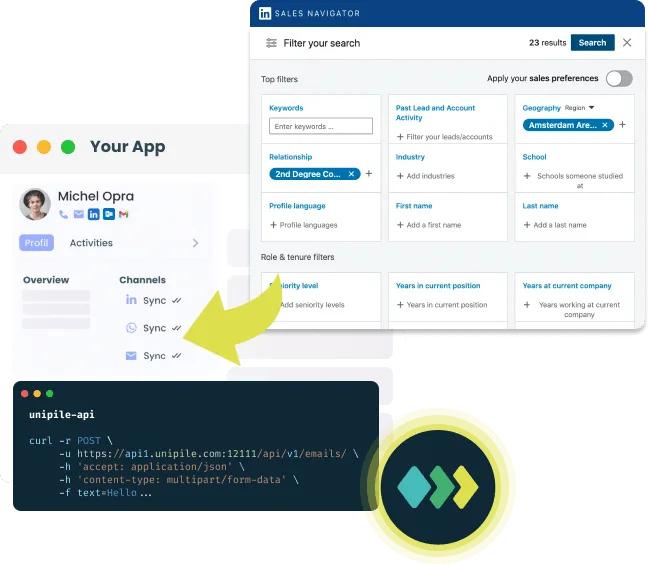
Introduction to UniPile’s LinkedIn API

Unipile offers a powerful API that allows developers to access and integrate comprehensive LinkedIn company data on behalf of authenticated users. This API supports advanced data retrieval and integration, enhancing business applications through detailed LinkedIn data access.

Unipile is an independent technical intermediary, not a LinkedIn partner, affiliate, or data vendor. Company searches and profile fetches are executed only once one of your end users has personally connected their own LinkedIn, Sales Navigator or Recruiter account and has initiated the workflow from your product. Access stays bounded by what that user can already see from their own session: no shared pools of accounts, no privileged backend, no lookup against accounts whose owner has not actively linked them.
curl --request POST \
     --url https://{YOUR DSN}/api/v1/linkedin \
		 --header 'X-API-KEY:XXXX' \
     --header 'accept: application/json' \
     --header --header'accept: application/json'
Unipile’s API includes features such as:
– Company Data Access: Retrieve detailed information about companies listed on LinkedIn.
– Search Capabilities: Perform advanced searches for companies based on specific criteria.
– Data Filtering: Filter search results to refine data output.
– Integration Tools: Seamlessly integrate LinkedIn data with other systems and applications.
How LinkedIn Extract Search Company API Works
Company search results, profile fields, and related metadata exposed by the API are returned on demand from the authenticated user’s own LinkedIn session. Unipile does not keep a separate company directory or build a parallel copy of LinkedIn data: each company lookup is triggered by your application and limited to what the current workflow needs.
Identifying LinkedIn Endpoints
To access LinkedIn company data via Unipile, connect your users’ LinkedIn accounts through Unipile’s authentication flow. Once authenticated, use Unipile’s documented API endpoints to retrieve the data your application needs. No manual network inspection or URL capture is required.
Capturing Raw Data
With the endpoint selected from Unipile’s API documentation, retrieve data using standard HTTP requests.
Integrating Data into Your Application
After retrieving the raw API response, integrate it into your application. Verify the data for accuracy using interactive documentation to test parameters. Adjust variables for keywords, pagination, and more to automate data retrieval and provide real-time updates, enhancing recruitment, sales, and networking activities.
What Data Can Be Retrieved with Extract Search Companies LinkedIn API?

Retrieve Detailed Company Data via LinkedIn API
Using the Search Companies LinkedIn API, you can retrieve a variety of detailed information about companies listed on LinkedIn. This includes essential data such as the company’s LinkedIn profile link, industry, location, and size, as well as additional insights like follower count and a link to the company’s insights page if using Sales Navigator. This comprehensive data access allows for in-depth company analysis and integration into business applications.
Retrieve Company Data & Profiles

With Unipile’s LinkedIn API, you can access detailed data from both company pages and individual profiles. For individual profiles, you can retrieve data like name, email, work experience, skills, current company, and location. This functionality offers a comprehensive and integrated view of LinkedIn data for enhanced analysis and utilization.

Integrating LinkedIn Search into Your CRM and ATS
LinkedIn for ATS: Optimize your recruitment processes by integrating LinkedIn data into your ATS to access top candidate profiles, streamline hiring workflows, and improve decision-making.
Advantages:
Enhanced Data Accuracy: Integrating LinkedIn data ensures your CRM and ATS systems are populated with accurate and current information, reducing errors and improving overall data quality.
Improved Decision-Making: Access to comprehensive LinkedIn data allows for better insights into potential clients, partners, and candidates, leading to more informed and strategic decisions.
LinkedIn defines and periodically adjusts search volumes, company lookup quotas and daily limits attached to each seat. Unipile relays those live signals, rate-limit headers, quota responses, error states, so your CRM or ATS integrations can slow down, queue, or reschedule gracefully. Choosing how often and at what volume to sync company data remains a customer-side decision, and every deployment must stay within what a single authenticated account can legitimately sustain under LinkedIn’s current terms.
Boosting Customer Relationship Management with LinkedIn Data

Integrating LinkedIn data into your CRM enriches your customer profiles with valuable information such as industry, company size, and location. This integration helps in better understanding your clients, personalizing communication, and identifying potential leads. It enables more targeted marketing efforts and fosters stronger, more meaningful customer relationships.


Optimizing Talent Acquisition with LinkedIn Data Profile

Integrating LinkedIn data into your ATS streamlines the recruitment process by providing detailed candidate profiles, including their experience, skills, and current employment. This integration enhances candidate sourcing, allows for more effective talent matching, and speeds up the hiring process by having all relevant information readily available.
Enhancing Engagement Campaigns with LinkedIn Data

Incorporating LinkedIn data into your outreach tools empowers your sales and marketing teams with detailed insights into potential leads. This integration allows for more personalized and effective communication, as you can tailor your messages based on the recipient’s professional background, company, and industry. It improves engagement rates and helps build stronger connections with your target audience.
More Than an Extension: Advanced LinkedIn Company Search API
The LinkedIn Company Search API offers more than just an extension; it provides a powerful, integrated solution for accessing detailed LinkedIn company data. Starting with LinkedIn Sales Navigator, you can search and retrieve comprehensive company information, including industry, location, phone number, website, specialties, and year founded. This data is then seamlessly integrated into your CRM, enhancing your sales and business strategies. With this API, your systems benefit from real-time updates and enriched information, giving you a significant edge in efficiency and effectiveness. For the full comparison, see our LinkedIn browser extension guide.


Discover LinkedIn’s Full Potential with Unipile’s API Integration
| Features |
LinkedIn
|
|---|---|
| Account connection | |
| Hosted Auth: White label to connect your end users |  |
| Custom auth: connect user with credentials, cookies, your chrome extension | |
| Messages | |
| Send & Reply Messages | |
| Send an InMail | |
| List Messages, Chats & Attendees | |
| List Reactions | |
| Read Receipts | |
| Send Files attachments | |
| Receive Files attachments API | |
| Send Voice Notes | |
| Send Embed Video | |
| Users/Profiles | |
| Retrieve a Profile | |
| Retrieve & Edit own profile | |
| List all relations & Followers | |
| List all Invitations Sent & Received | |
| Handle & Cancel a received Invitation |
|
| Send an Invitation |
|
| Cancel an Invitation |
|
| List all posts, comments, reactions |
|
| Posts | |
| Retrieve & Create a post |
|
| List all comments from a post |
|
| List all posts, comments, reactions |
|
| Comment a post |
|
| List all reactions from a post |
|
| Add a reaction to a post, comment |
|
| Webhooks | |
| Account status | |
| New Message | |
| New Reaction / Read / Event | |
| Specific | |
| Retrieve Recruiter hiring projects | |
| Perform an action with a user profile | |
| Retrieve a company profile |
|
| Get raw data from any endpoint (Inbox Search, Following someone, Get own profile viewers, Social Selling Index, Retrieve posts from Feed) | |
| Get inmail credit balance | |
| Retrieve LinkedIn search parameters |
|
| Perform Linkedin search | |
| List all job postings | |
| Create a job posting |
|
| Get job posting | |
| Publish a job posting | |
| Solve a job publishing checkpoint | |
| Close a job posting | |
| List all applicants to a job posting |
|
| Get a specific applicant to a job posting |
|
| Download the resume of a job applicant |
|
| Endorse a user profile specific skill |
|
| Webhooks | |
| Account status | |
| New Message | |
| New Reaction / Read / Event | |
| Inboxes | |
| LinkedIn Classic Inbox | |
| Sales Navigator Inbox | |
| LinkedIn Recruiter Inbox | |
| LinkedIn Company Page | |
LinkedIn Features


Account Connection
Hosted Auth: White label to connect your end users
Custom auth: connect user with credentials, cookies, your chrome extension
Messages
Send & Reply Messages
Send an InMail
List Messages, Chats & Attendees
List Reactions
Read Receipts
Send Files attachments
Receive Files attachments API
Send Voice Notes
Send Embed Video
Users/Profiles
Retrieve a Profile
Retrieve & Edit own profile
List all relations & Followers
List all Invitations Sent & Received
Handle & Cancel a received Invitation
Send an Invitation
Cancel an Invitation
List all posts, comments, reactions
Posts
Retrieve & Create a post
List all comments from a post
List all posts, comments, reactions
Comment a post
List all reactions from a post
Add a reaction to a post, comment
Webhooks
Account status
New Message
New Reaction / Read / Event
Specific
Retrieve Recruiter hiring projects
Perform an action with a user profile
Retrieve a company profile
Get raw data from any endpoint (Inbox Search, Following someone, Get own profile viewers, Social Selling Index, Retrieve posts from Feed)
Get inmail credit balance
Retrieve LinkedIn search parameters
Perform Linkedin search
List all job postings
Create a job posting
Get job posting
Publish a job posting
Solve a job publishing checkpoint
Close a job posting
List all applicants to a job posting
Get a specific applicant to a job posting
Download the resume of a job applicant
Endorse a user profile specific skill
Inboxes
LinkedIn Classic Inbox
Sales Navigator Inbox
LinkedIn Recruiter Inbox
LinkedIn Company Page
| Features |
LinkedIn
|
|---|---|
| Account connection | |
| Hosted Auth: White label to connect your end users | |
| Custom auth: connect user with credentials, cookies, your chrome extension | |
| Messages | |
| Send & Reply Messages | |
| Send an InMail | |
| List Messages, Chats & Attendees | |
| List Reactions | |
| Read Receipts | |
| Send Files attachments | |
| Receive Files attachments API | |
| Send Voice Notes | |
| Send Embed Video | |
| Users/Profiles | |
| Retrieve a Profile | |
| Retrieve & Edit own profile | |
| List all relations & Followers | |
| List all Invitations Sent & Received | |
| Handle & Cancel a received Invitation |
|
| Send an Invitation |
|
| Cancel an Invitation |
|
| List all posts, comments, reactions |
|
| Posts | |
| Retrieve & Create a post |
|
| List all comments from a post |
|
| List all posts, comments, reactions |
|
| Comment a post |
|
| List all reactions from a post |
|
| Add a reaction to a post, comment |
|
| Webhooks | |
| Account status | |
| New Message | |
| New Reaction / Read / Event | |
| Specific | |
| Retrieve Recruiter hiring projects | |
| Perform an action with a user profile | |
| Retrieve a company profile |
|
| Get raw data from any endpoint (Inbox Search, Following someone, Get own profile viewers, Social Selling Index, Retrieve posts from Feed) | |
| Get inmail credit balance | |
| Retrieve LinkedIn search parameters |
|
| Perform Linkedin search | |
| List all job postings | |
| Create a job posting |
|
| Get job posting | |
| Publish a job posting | |
| Solve a job publishing checkpoint | |
| Close a job posting | |
| List all applicants to a job posting |
|
| Get a specific applicant to a job posting |
|
| Download the resume of a job applicant |
|
| Endorse a user profile specific skill |
|
| Webhooks | |
| Account status | |
| New Message | |
| New Reaction / Read / Event | |
| Inboxes | |
| LinkedIn Classic Inbox | |
| Sales Navigator Inbox | |
| LinkedIn Recruiter Inbox | |
| LinkedIn Company Page | |
How to Integrate LinkedIn Retrieve Profile API into Your Application

To get started, thoroughly review the LinkedIn Company Search API documentation to understand its capabilities and limitations. Modify your application to align with the API’s data structure, focusing on key company data points to enhance your CRM and business tools. Schedule regular data imports to keep company information up-to-date, improving decision-making in recruitment, sales, and networking. Consistently perform maintenance and testing to ensure smooth integration, thereby maximizing the effectiveness of LinkedIn’s robust Company Search API. This powerful integration offers more than just an extension; it provides a comprehensive solution for accessing and utilizing LinkedIn company data.
curl --request POST \
     --url https://{YOUR DSN}/api/v1/linkedin \
		 --header 'X-API-KEY:XXXX' \
     --header 'accept: application/json' \
     --header --header'accept: application/json'
Developer Advantages of the LinkedIn Get Profile API


Dedicated Support Throughout Integration
Our committed support team is ready to assist you at every step, before, during, and after the integration process. They provide real-time help to ensure seamless integration without incurring additional costs.
Developer Support
Efficiently integrate the LinkedIn Invite API using our comprehensive documentation and sample code. These resources are tailored to simplify your integration effort and enhance your application’s capability to send invitations.
Consistent Updates and Maintenance
Benefit from ongoing updates and proactive maintenance with the LinkedIn Invite API. This keeps the API functioning smoothly, in line with LinkedIn’s latest standards and enhancements, thus minimizing downtime and boosting performance.
FAQs
What is Unipile’s LinkedIn API?
Unipile’s LinkedIn API is a robust tool designed to help developers access and utilize detailed LinkedIn company data, enhancing business applications through comprehensive data integration and analysis.
What kind of company data can I retrieve using Unipile’s LinkedIn API?
You can retrieve a variety of detailed information including company profiles, industry, location, phone number, website, specialties, and year founded.
How can I integrate LinkedIn data into my CRM system?
To integrate LinkedIn data into your CRM, use Unipile’s LinkedIn API to retrieve company information on behalf of each authenticated user and then map this data to your CRM fields, ensuring regular updates for accuracy and relevance.
Is Unipile an official LinkedIn partner?
No. Unipile is not affiliated with, endorsed by, or sponsored by LinkedIn. It operates as an independent technical intermediary that lets software publishers connect authenticated LinkedIn accounts to their application. Every company lookup or search is performed on behalf of the user who owns that account, within workflows the user has initiated. Third-party platform features and conditions may change over time.
What are the benefits of integrating LinkedIn data into an ATS?
Integrating LinkedIn data into an ATS streamlines the recruitment process by providing detailed candidate profiles, enhancing talent matching, and speeding up hiring with accurate and comprehensive information.
How do I get started with Unipile’s LinkedIn API?
Start by thoroughly reviewing the API documentation to understand its capabilities. Then, modify your application to align with the API’s data structure and set up regular data imports for real-time updates.
What are the security measures for using LinkedIn’s API?
Unipile relies on HTTPS for all data transmission, on per-user authenticated sessions for access control, and exposes rate-limit signals so your integration stays within safe boundaries. Customers remain responsible for encrypting any data they persist on their side and for keeping their own security protocols up to date.
Can I automate data retrieval with Unipile’s LinkedIn API?
Yes, you can schedule regular data imports and automate data retrieval to ensure your information is always up-to-date, aiding in better decision-making for recruitment, sales, and networking.
What support is available during the integration of Unipile’s LinkedIn API?
Unipile provides live support and comprehensive documentation to assist you throughout the integration process, ensuring smooth implementation without additional costs.
What company data can the API actually surface?
The API only exposes information that the authenticated user can already see from their own LinkedIn, Sales Navigator or Recruiter session, public company pages, search results their plan entitles them to, and related metadata. There is no cross-account lookup, no privileged backend query, and no parallel company database maintained on Unipile’s side.
Who is responsible for respecting LinkedIn's search quotas?
Unipile relays LinkedIn’s own rate limits, search quotas, and usage signals so your application can slow down or queue in real time. However, deciding how often to run company searches and at what volume remains the customer’s responsibility, and every deployment must stay aligned with LinkedIn’s current terms and with what a single authenticated seat can legitimately sustain.


