 LinkedIn
 Join Slack Community
DMA
Our solution is built in line with the Digital Markets Act (DMA). User profiles are never stored or scraped, and our API focuses exclusively on enabling messaging interoperability. Clients are expected to comply with the terms of each provider.
Integrating WhatsApp messaging into your software is no longer just a nice-to-have, it’s a growth enabler. With over 2 billion users worldwide, WhatsApp has become the preferred communication channel for sales, recruitment, and customer support. For software editors building CRMs, ATS, or outreach platforms, adding the ability to send messages via WhatsApp API can transform user engagement and conversion rates.
In this guide, we’ll break down how the WhatsApp API works, how to send messages programmatically, and why Unipile’s unified API offers the fastest and most flexible way to integrate WhatsApp messaging directly into your product.
What is the WhatsApp API?
The WhatsApp API enables developers to integrate sending and receiving messages directly into their software. Unlike the consumer or business mobile apps, the API provides endpoints to:
This makes it ideal for SaaS tools that handle communication, CRMs, recruiting software, customer support platforms, or outreach solutions.
WhatsApp API






curl -X POST \
  --url https://api1.unipile.com:13111/api/v1/chats/2356/messages \
  -H 'accept: application/json' \
  -H 'content-type: multipart/form-data' \
  -F text=Hello ...
Official Ways to Send Messages with WhatsApp
Before choosing how to integrate WhatsApp into your product, it is essential to understand the difference between the three available versions: WhatsApp App (Classic), WhatsApp Business App, and WhatsApp Business API / Cloud API. Each has its own purpose and level of flexibility.
WhatsApp App (Classic)
This is the regular mobile application used by individuals. It does not include an official API, meaning you cannot send messages programmatically through Meta tools. However, with the Unipile unified API, even these personal accounts can be securely connected and synchronized, enabling message sending directly from your platform interface.
WhatsApp Business App
Designed for small companies, the WhatsApp Business App allows teams to manage conversations with basic features like quick replies or labels. Yet it still lacks a public API for developers, making multi-user integration impossible without a third-party solution such as Unipile.
WhatsApp Business API and Cloud API
The official Meta APIs are built for enterprises needing structured, automated messaging. The Business API (on-premise) must be self-hosted, while the Cloud API is hosted directly by Meta. Both allow sending messages, managing templates, and automating flows, but come with significant limitations: approval requirements, per-conversation billing, and restricted access to verified business accounts only.
For most SaaS editors, these options remain too rigid and time consuming to deploy. That is why solutions like the Unipile unified API provide a faster and more accessible alternative, letting your users send WhatsApp messages in real time without Meta onboarding or hosting constraints.
WhatsApp Cloud API: Meta Simplified Alternative
To make WhatsApp integration more accessible, Meta introduced the Cloud API, a hosted version of its Business API running on Meta own servers. It removes the need for businesses to maintain their own infrastructure, which can reduce setup costs and simplify growth.
However, while the Cloud API offers the same per-message pricing as the on-premise Business API, its accessibility remains constrained. Only verified business accounts can use it, and every automated message still requires template approval from Meta.
For software vendors and SaaS publishers, these restrictions mean that even with Cloud hosting, the process remains far from agile. By contrast, unified API solutions like Unipile deliver a predictable pricing structure and instant integration, with full access to personal or business WhatsApp accounts within minutes.
Build NowSending Messages with the Unipile WhatsApp API
For CRMs, ATS, and outreach tools, Unipile offers a unified alternative that lets your users connect their personal or business WhatsApp accounts instantly, with no Meta approval and no server management.
Once the account is connected through QR code authentication, developers can programmatically:
The Unipile API abstracts all WhatsApp complexities into RESTful HTTP requests, enabling developers to build messaging features in just days.
Sign Up# Send a message in an existing chat
POST https://api1.unipile.com:13111/api/v1/chats/{chat_id}/messages
{
"account_id": "your_whatsapp_account",
"text": "Hello from the Unipile API"
}
# Retrieve all chats of a connected account
GET https://api1.unipile.com:13111/api/v1/chats
    ?account_id={account_id}&limit=20
Why Sending Messages via the Unipile API Is Simpler
With Unipile, sending messages through WhatsApp becomes effortless. Instead of dealing with multiple APIs or the restrictive Meta approval system, you connect once and access all major channels, WhatsApp, LinkedIn, and Email, through a single integration. The onboarding flow is simple and secure: your users authenticate via QR code, and messages start syncing instantly.
Connect once and reach WhatsApp, LinkedIn, and Email from the same set of endpoints.
No template validation and no message count limits, your users authenticate in seconds.
Pricing is fixed per connected account, so your costs stay stable as message volumes grow.
Every interaction is handled under strict security standards, ensuring privacy and reliability.
Developers also get SDKs in multiple languages, so WhatsApp messaging features ship in days rather than weeks. Unipile turns a complex, provider dependent process into a developer friendly experience built for fast moving software teams.
Send Text and Voice Messages with the WhatsApp API
With the Unipile unified API, software editors can let their users send WhatsApp messages instantly, not only classic text, but also voice messages that make conversations more personal and engaging.
Hi, could you send me the details of the offer?
Sure, sending everything right now.
Perfect, I just received everything. Thanks!
Send Text and Voice Messages with the WhatsApp API
With Unipile’s unified API, software editors can let their users send WhatsApp messages instantly, not only classic text, but also voice messages that make conversations more human and personal.
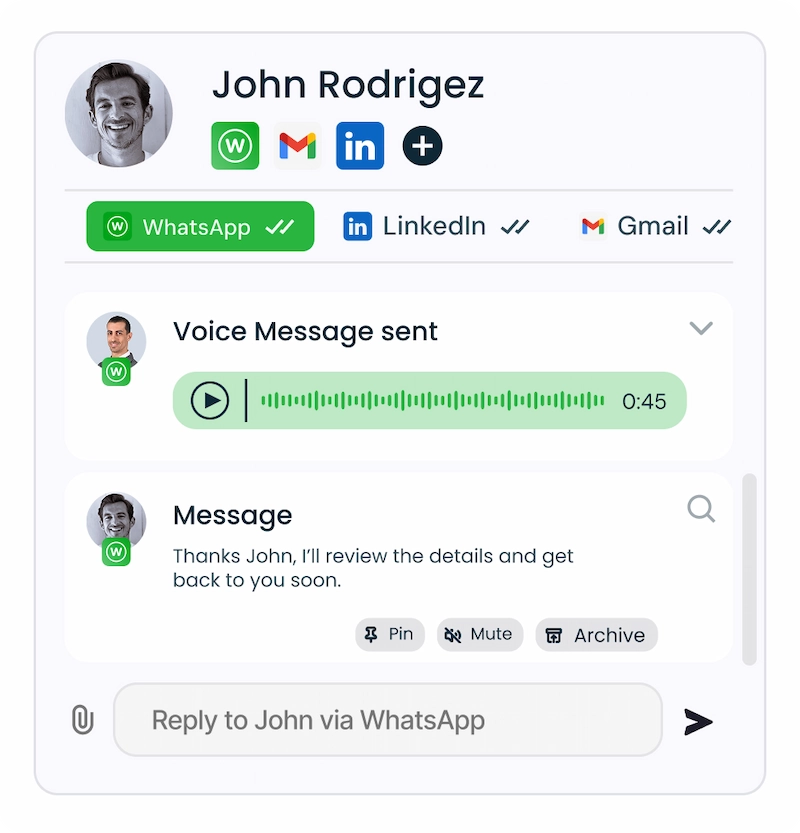
Text messages remain the most widely used format. They allow your users to reply quickly to leads, candidates, or customers directly from your interface. Each message is synchronized in real time, ensuring that both inbound and outbound exchanges appear exactly as they would in the WhatsApp mobile app. Developers can trigger them programmatically through simple API routes such as /messages, making automation straightforward to implement.
Beyond text, the API also supports voice messages, one of WhatsApp’s most engaging features. Users can record or attach an audio file directly from your platform, a perfect fit for recruiters leaving detailed feedback or sales reps adding a personal touch to their follow-ups. These messages are transmitted securely and appear as standard voice notes in the user’s conversation thread, with playback controls embedded inside your product UI.
Unipile ensures full media synchronization, including read receipts, timestamps, and message history, so your users never lose context between channels.
Manage Group Conversations and Collaboration
Meta caps its own Groups API at 8 participants and exposes no add-participant endpoint. See the full breakdown in our WhatsApp Group API guide.
WhatsApp groups have become a natural way for teams to communicate, whether coordinating projects, hiring campaigns, or client follow-ups. Through Unipile’s API, you can bring this collaborative layer directly into your SaaS product.
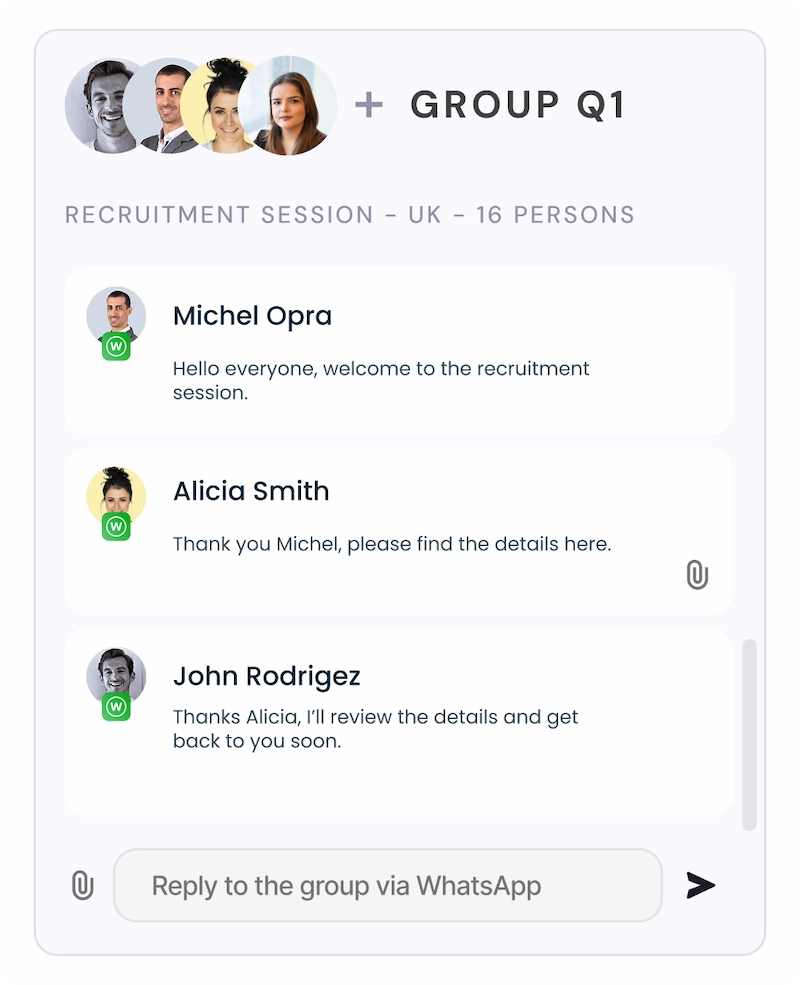
Your users can list, create, and manage groups from their connected WhatsApp accounts without leaving your interface. Every message, media file, or reaction posted in a group is synchronized in real time, giving your platform the same fluid experience as the native app.
This feature is especially powerful for ATS, CRM, and outreach tools, where multiple users often interact with the same contact base. Recruiters can manage candidate discussions within a shared thread; sales teams can collaborate on client interactions; support agents can share updates on open cases, all inside one unified inbox.
Unipile’s unified architecture handles synchronization, permissions, and webhooks automatically, ensuring each group stays up to date across accounts and devices. Developers don’t need to manage session states or WebSocket connections, it’s all handled by the platform.
WhatsApp API Capabilities
WhatsApp API integration is easy for software editors, whether you are building a CRM, ATS, or Outreach tool. No Business API restrictions, no Meta onboarding nightmare. Just real time sync of chats, groups, and contacts from the accounts your users connect.
Messages
10 endpoints available
Account Connection
2 endpoints available
Attachments
2 endpoints available
Webhooks
3 events available
Why Choose Unipile Instead of the Meta Official WhatsApp API
While the official Meta WhatsApp Business API is designed for large enterprises with strict approval workflows and limited flexibility, Unipile offers a unified and developer friendly alternative. With Unipile, software editors can instantly connect any WhatsApp or WhatsApp Business account through a simple QR authentication, send and receive text or voice messages, manage groups, and go live in just a few days. No hosting, no message templates, and no 24 hour restrictions, just real time messaging integrated directly inside your CRM, ATS, or outreach platform.
| Capability |
Meta official path
|
Unipile for WhatsApp App and Business App |
|---|---|---|
| API availability | No API for the App or the Business App | Unified API to connect existing accounts |
| Onboarding | Not supported for these apps | QR flow hosted inside your product |
| Message templates | Not applicable | No template approval required |
| 24 hour window | Not applicable | Standard chat continuity from the user device |
| Groups | Not available | Create and manage groups in app |
| Media and voice | Not available | Send and receive files and voice notes |
| Multi agent use | Not available | Shared inbox with permissions |
| Time to integrate | No available path | Days to go live with a single API surface |
| Cross channel | Separate builds for each provider | Same model for WhatsApp, LinkedIn and Email |
| Hosting and upkeep | Self hosted or not applicable | Fully managed by Unipile with webhooks |
Integrate WhatsApp in Your Software Seamlessly with Unipile
ntegrating WhatsApp into your product with Unipile takes only a few steps. Once you create your app in the Unipile dashboard, your users can link their WhatsApp or WhatsApp Business accounts through a secure QR code authentication. From there, you instantly gain access to message sending, voice notes, media attachments, and group management, all through a single, unified API.
Unlike Meta’s ecosystem, you don’t need to manage servers, request template approvals, or handle complex onboarding flows. Unipile handles synchronization, hosting, allowing your development team to focus on creating new product features rather than infrastructure.
Your integration can be live in just two days, with Official Node.js SDK, plus a documented REST API you can call from any language, full documentation, and responsive technical support. Once connected, you can start sending and receiving messages in real time, the same way your users already do on WhatsApp, but fully embedded inside your CRM, ATS, or outreach platform.
How to Integrate WhatsApp with Unipile in Minutes
Connecting WhatsApp to your software with Unipile is fast, secure, and developer friendly. Start by signing up to create your API account, then log in to the dashboard to manage all connected channels, LinkedIn, Gmail, WhatsApp, and more.
From there, your users can authenticate their WhatsApp account through a simple QR code login, the same way they would on the mobile app. Once linked, conversations, voice messages, and files sync instantly inside your product. No configuration headaches, no waiting for Meta approval, just a real time, ready to use messaging layer embedded in your CRM, ATS, or outreach platform.
Sign Up to Unipile
Create your API account in a few seconds, no credit card required.
 Dashboard
By signing up, you create a Unipile account and agree to the Terms of service and Privacy Policy.
Log in to the Dashboard
Access your workspace and manage every connected account from one place.
Accounts
Link account
Quick WhatsApp API integration with QR code authentication
With Unipile, connecting a WhatsApp account takes just a few minutes. The flow is simple, secure, and avoids the long Meta business approval process. Here is how it works:
1. Request a QR code
Your application generates a unique QR code through the Unipile API. Your user simply scans it with WhatsApp to start the authentication.
2. Display the QR code
Show the code inside your own interface with the hosted auth flow or your custom screen. The code stays valid for 60 seconds and can be refreshed on demand.
3. Confirm authentication
Unipile validates the session and returns the account id of the connected user. The account status is then pushed to your backend through webhooks.
4. Start messaging
Chats, contacts, and history sync instantly. Your users can send text, files, and voice notes directly from your product, with delivery statuses returned in real time.
Explore more with
our Messaging API
Unipile doesn’t stop at WhatsApp. With a single integration, your software can also connect LinkedIn, Gmail, Outlook, Instagram, Messenger, Telegram, and X (Twitter). This unified layer brings every conversation, comment, and message together in one place, creating a truly cross-channel inbox for your users.
By syncing all communications in real time, Unipile helps your app deliver a smoother workflow, boost user productivity, and ensure a consistent experience across every connected channel.
Integration Support and Resources for WhatsApp API Success

Secure an on demand meeting with our founders (CTO and CEO) to align on technical and product strategy.
Our live support is at your disposal before, during, and after integration, ensuring guidance at every step without extra cost.
Fast Integration, No Complexity
Connecting WhatsApp with Unipile is effortless. Our unified API handles authentication and synchronization, so you can move from testing to production without the friction of the Meta approval process. No hosting setup, no template validation, just a ready to use, fully managed messaging layer.
Expert Support from Start to Launch
The Unipile engineering team works closely with your developers to guarantee a smooth rollout. You get access to in depth documentation, SDKs, and personalized technical guidance throughout your integration process, ensuring your deployment is stable, fast, and reliable from day one.
Always Up to Date and Reliable
Unipile evolves in sync with every provider. Whether it is WhatsApp, LinkedIn, or Gmail, our connectors stay automatically compatible, removing the need for manual updates. Your software remains secure and compliant, with predictable maintenance costs as your usage grows.
Start integrating smarter, not harder, build your WhatsApp experience with Unipile today.
FAQ, WhatsApp API to Send Messages
Everything software publishers ask before integrating WhatsApp messaging into their product.
Still have a question about your WhatsApp integration?
Talk to an ExpertYou may also like

LinkedIn Search API: Amplifying User Value for Editors
LinkedIn, the world’s largest professional networking platform, offers various tools and services to help users connect, engage, and grow their networks. Among these is the LinkedIn API Search feature, which allows seamless integration of LinkedIn's search capabilities into applications. What is...
LinkedIn API Guide 2026: Complete Integration Tutorial & Best Practices
What is LinkedIn API? The LinkedIn API (Application Programming Interface) is the essential bridge between your application and LinkedIn, acting on behalf of your authenticated users. Whether you're building recruitment software, CRM systems, or workflow automation tools, understanding LinkedIn...
 EN
EN  FR
FR  ES
ES  DE
DE  IT
IT  BR
BR  NL
NL  PL
PL  TR
TR