
 LinkedIn
 Instagram
 WhatsApp
 Telegram
 Gmail
Gmail Outlook
 Google Calendar
 Join Slack Community
What is a LinkedIn Company Scraper?

A LinkedIn company scraper is a method to automatically extract company data from LinkedIn, like size, industry, and location. Editors who need this at scale usually move to a LinkedIn scraper API, which returns the same company fields through authenticated API calls. This data helps streamline CRM, ATS, iPaaS, and outreach tools, improving business operations and lead generation.

The LinkedIn company scraper feature enables you to extract vital company information such as company name, industry, location, description, website, and phone number directly from LinkedIn profiles. This feature integrates smoothly with CRM, ATS, iPaaS, and outreach tools, streamlining data collection and enhancing overall efficiency in your business operations.
The Importance of LinkedIn Data in Sotware Systems
LinkedIn is one of the largest business-focused platforms, boasting data on over 30 million companies. For CRM editors, ATS platforms, iPaaS integrators, and outreach tools, LinkedIn’s vast repository of information is invaluable. With the help of a LinkedIn company scraper, businesses can effortlessly collect and organize this data, allowing them to make informed decisions based on up-to-date and accurate information.
Learn how to integrate LinkedIn API into your software
What Data Can Be Scraped from a LinkedIn Company Profile?

With a LinkedIn company scraper, you can extract a wide range of company-related data that can be used to enrich various software systems like CRM, ATS, iPaaS, and outreach tools.
How Scraped Data Enriches Different Software Systems
Leveraging LinkedIn’s company data extraction offers a competitive edge for software vendors across different industries. By integrating this rich dataset, vendors can enhance their platforms’ functionality, providing users with actionable insights, improved automation, and better decision-making tools.

With a LinkedIn company scraper, you can do more than just scrape individual company profiles—you can also extract data from a full LinkedIn search result. This means you can collect valuable information on multiple companies at once based on specific search criteria, such as industry, location, company size, or keywords. By scraping search results, you can build comprehensive lists of potential leads or target companies, which can then be integrated into your CRM, ATS, iPaaS, or outreach tools to enrich your databases and optimize your business strategies.

The data scraped, such as company name, size, industry, and location, can automatically populate your CRM system. This helps sales teams build detailed customer profiles, identify potential leads, and segment clients based on industry or company size, improving overall customer management and outreach.
Benefits of Scraping LinkedIn Search Results for Enrichment
Time Efficiency: Automating the extraction of data from search results eliminates the need for manual research. Instead of individually reviewing company profiles, the scraper retrieves relevant company details in bulk, freeing up valuable time for more strategic tasks.
Accuracy: Scraping from LinkedIn ensures you’re gathering the most up-to-date and reliable company data. Whether it’s company size, industry, or location, the information comes directly from LinkedIn’s current listings, reducing errors and improving the quality of your data.
LinkedIn for CRM & LinkedIn for ATS: With data scraped from search results, your CRM and ATS tools are automatically enriched with comprehensive company information. This not only helps in better segmenting customers or candidates but also leads to more accurate targeting for sales, recruitment, and marketing efforts.
Scalability: As your business grows and data needs increase, manually searching and updating records becomes unsustainable. A LinkedIn company scraper provides scalable solutions, enabling you to handle larger data volumes without increasing your manual workload.
Enhanced Lead Generation: Scraping LinkedIn search results allows you to create detailed lists of potential leads or target companies based on specific criteria, such as industry or size. This enriched data can then be used for highly targeted outreach campaigns, increasing conversion rates and maximizing your sales efforts.
Legal and Ethical Considerations of Using LinkedIn Scrapers
While the use of a LinkedIn company scraper can provide a competitive edge, businesses must be aware of the legal and ethical concerns that come with scraping data from LinkedIn. LinkedIn’s terms of service explicitly prohibit the scraping of data, and businesses that violate these terms risk legal action or account suspension.
Scraping LinkedIn Profiles Alongside Company Data
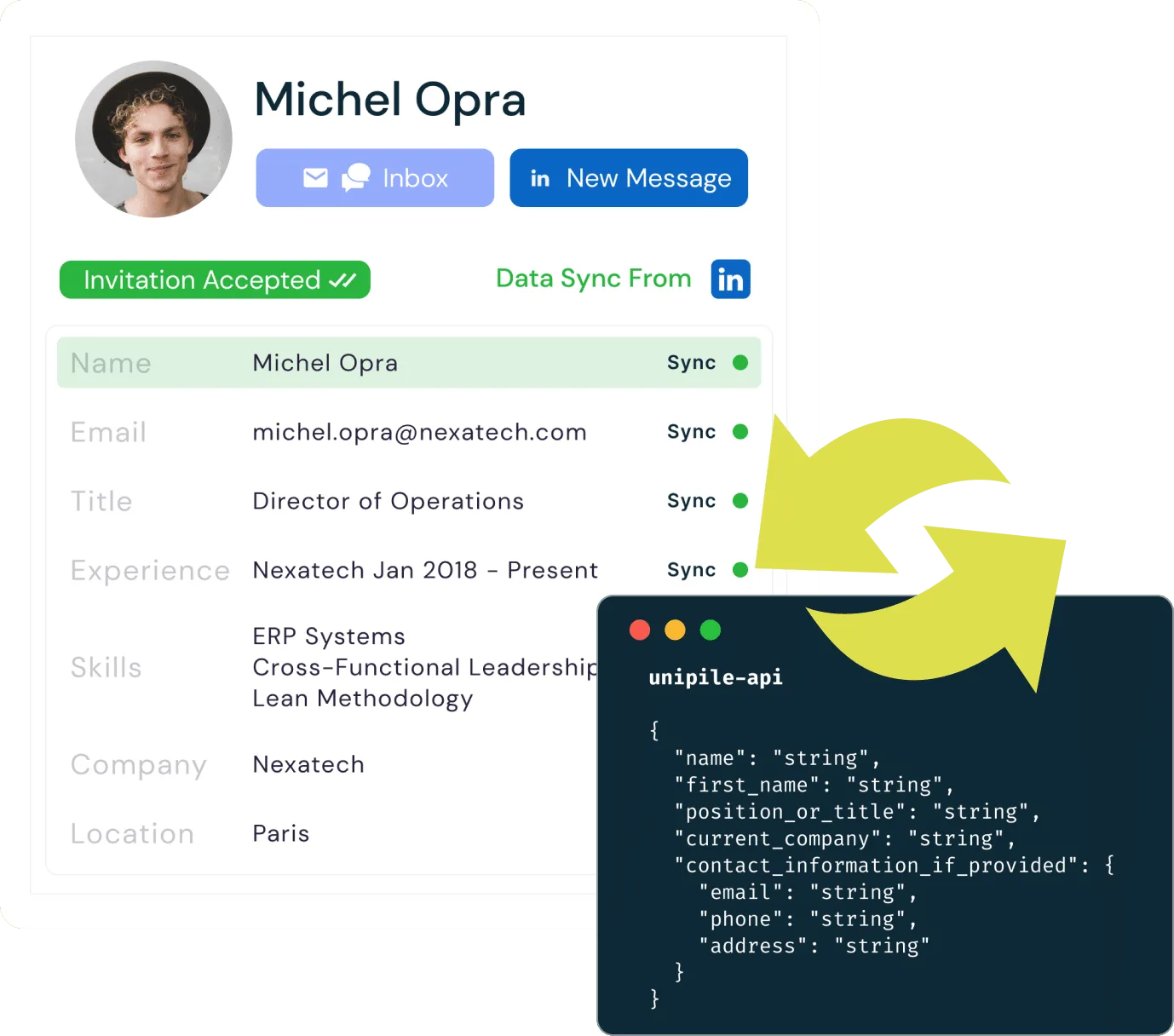
In addition to scraping company information, a LinkedIn profile scraper allows you to extract detailed personal data from individual profiles. This includes crucial details such as name, email, job title, company, experience, skills, and location. By combining both company and profile scraping, businesses can enrich their CRM, ATS, or outreach tools with accurate, up-to-date data, making it easier to personalize interactions, qualify leads, and improve recruitment efforts. This dual scraping approach enables deeper insights into both organizations and key decision-makers, optimizing engagement strategies.
Scraping LinkedIn Profiles Alongside Company Data
While a LinkedIn company scraper provides valuable company and profile data, its real power is amplified when integrated with other data sources, like WhatsApp and Email APIs (Gmail, Outlook, IMAP). By combining LinkedIn data with these communication platforms, businesses can gain a more comprehensive view of their prospects and improve outreach efficiency.
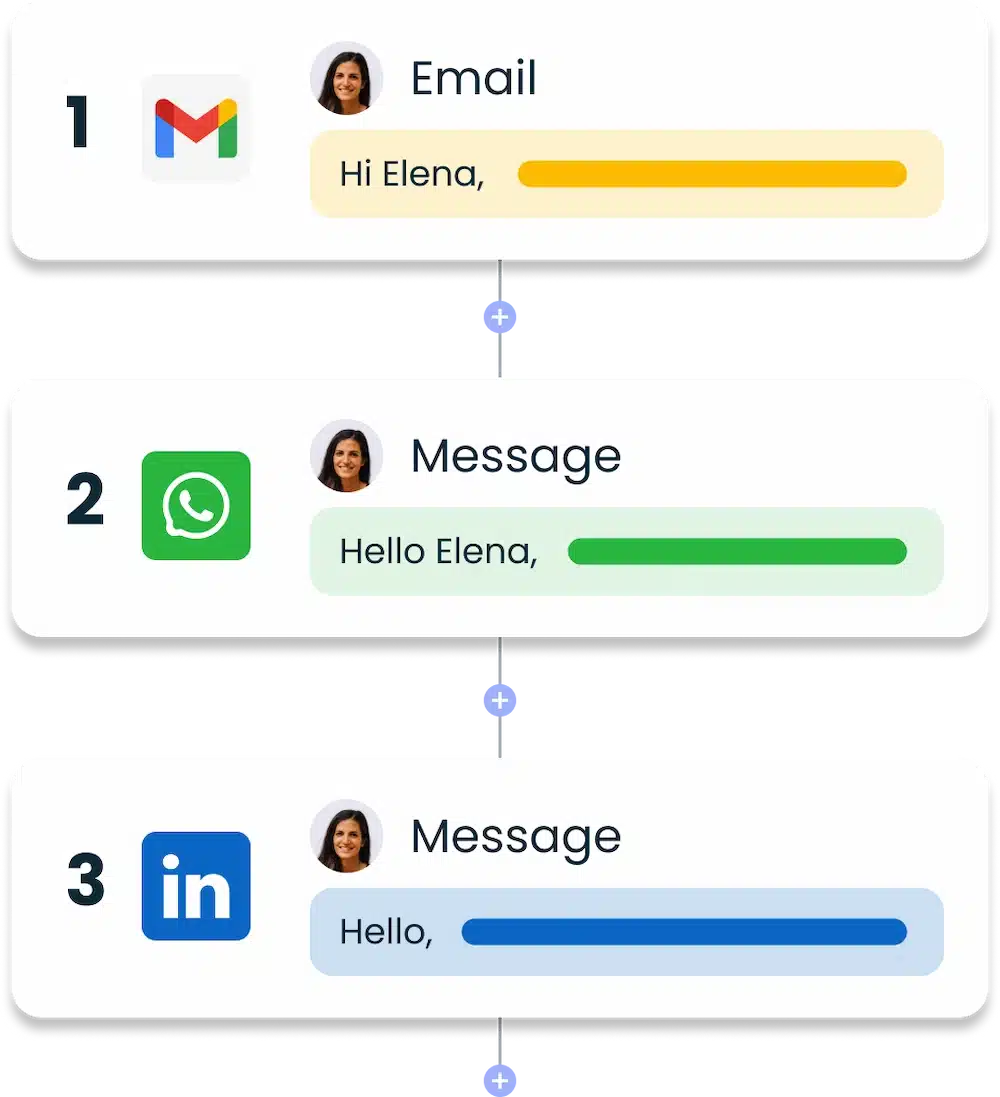
With the integration of LinkedIn data, WhatsApp API, and Email API (Gmail, Outlook, IMAP), businesses can create powerful outreach sequences across multiple channels. You can automate personalized messages on WhatsApp, follow up via email, and engage directly through LinkedIn. By combining company information from LinkedIn with real-time communication on these platforms, your outreach sequences become more targeted and effective. This multi-channel approach allows you to track responses, automate follow-ups, and nurture leads seamlessly, enhancing engagement and improving conversion rates through coordinated, data-driven interactions.
Explore LinkedIn Capabilities with Unipile’s API Integration
| Features |
LinkedIn
|
|---|---|
| Account connection | |
| Hosted Auth: White label to connect your end users |  |
| Custom auth: connect user with credentials, cookies, your chrome extension | |
| Messages | |
| Send & Reply Messages | |
| Send an InMail | |
| List Messages, Chats & Attendees | |
| List Reactions | |
| Read Receipts | |
| Send Files attachments | |
| Receive Files attachments API | |
| Send Voice Notes | |
| Send Embed Video | |
| Users/Profiles | |
| Retrieve a Profile | |
| Retrieve & Edit own profile | |
| List all relations & Followers | |
| List all Invitations Sent & Received | |
| Handle & Cancel a received Invitation |
|
| Send an Invitation |
|
| Cancel an Invitation |
|
| List all posts, comments, reactions |
|
| Posts | |
| Retrieve & Create a post |
|
| List all comments from a post |
|
| List all posts, comments, reactions |
|
| Comment a post |
|
| List all reactions from a post |
|
| Add a reaction to a post, comment |
|
| Webhooks | |
| Account status | |
| New Message | |
| New Reaction / Read / Event | |
| Specific | |
| Retrieve Recruiter hiring projects | |
| Perform an action with a user profile | |
| Retrieve a company profile |
|
| Get raw data from any endpoint (Inbox Search, Following someone, Get own profile viewers, Social Selling Index, Retrieve posts from Feed) | |
| Get inmail credit balance | |
| Retrieve LinkedIn search parameters |
|
| Perform Linkedin search | |
| List all job postings | |
| Create a job posting |
|
| Get job posting | |
| Publish a job posting | |
| Solve a job publishing checkpoint | |
| Close a job posting | |
| List all applicants to a job posting |
|
| Get a specific applicant to a job posting |
|
| Download the resume of a job applicant |
|
| Endorse a user profile specific skill |
|
| Webhooks | |
| Account status | |
| New Message | |
| New Reaction / Read / Event | |
| Inboxes | |
| LinkedIn Classic Inbox | |
| Sales Navigator Inbox | |
| LinkedIn Recruiter Inbox | |
| LinkedIn Company Page | |

LinkedIn Features
| Features |
LinkedIn
|
|---|---|
| Account connection | |
| Hosted Auth: White label to connect your end users | |
| Custom auth: connect user with credentials, cookies, your chrome extension | |
| Messages | |
| Send & Reply Messages | |
| Send an InMail | |
| List Messages, Chats & Attendees | |
| List Reactions | |
| Read Receipts | |
| Send Files attachments | |
| Receive Files attachments API | |
| Send Voice Notes | |
| Send Embed Video | |
| Users/Profiles | |
| Retrieve a Profile | |
| Retrieve & Edit own profile | |
| List all relations & Followers | |
| List all Invitations Sent & Received | |
| Handle & Cancel a received Invitation |
|
| Send an Invitation |
|
| Cancel an Invitation |
|
| List all posts, comments, reactions |
|
| Posts | |
| Retrieve & Create a post |
|
| List all comments from a post |
|
| List all posts, comments, reactions |
|
| Comment a post |
|
| List all reactions from a post |
|
| Add a reaction to a post, comment |
|
| Webhooks | |
| Account status | |
| New Message | |
| New Reaction / Read / Event | |
| Specific | |
| Retrieve Recruiter hiring projects | |
| Perform an action with a user profile | |
| Retrieve a company profile |
|
| Get raw data from any endpoint (Inbox Search, Following someone, Get own profile viewers, Social Selling Index, Retrieve posts from Feed) | |
| Get inmail credit balance | |
| Retrieve LinkedIn search parameters |
|
| Perform Linkedin search | |
| List all job postings | |
| Create a job posting |
|
| Get job posting | |
| Publish a job posting | |
| Solve a job publishing checkpoint | |
| Close a job posting | |
| List all applicants to a job posting |
|
| Get a specific applicant to a job posting |
|
| Download the resume of a job applicant |
|
| Endorse a user profile specific skill |
|
| Webhooks | |
| Account status | |
| New Message | |
| New Reaction / Read / Event | |
| Inboxes | |
| LinkedIn Classic Inbox | |
| Sales Navigator Inbox | |
| LinkedIn Recruiter Inbox | |
| LinkedIn Company Page | |
How to Integrate the LinkedIn Search API in Your App

Start by examining the LinkedIn API documentation to understand its features and limitations. Adapt your software to align with the API’s data structure, emphasizing key data points to enhance user profiles. Implement regular data imports to ensure up-to-date information, leading to better-informed decisions in recruitment, sales, and networking. Maintain ongoing maintenance and testing to ensure a seamless integration, maximizing the effectiveness of LinkedIn’s powerful APIs
Developer Advantages of the LinkedIn Search API


Dedicated Support Throughout Integration
Our committed support team is ready to assist you at every step—before, during, and after the integration process. They provide real-time help to ensure seamless integration without incurring additional costs.
Developer Support
Efficiently integrate the LinkedIn Invite API using our comprehensive documentation and sample code. These resources are tailored to simplify your integration effort and enhance your application’s capability to send invitations.
Consistent Updates and Maintenance
Benefit from ongoing updates and proactive maintenance with the LinkedIn Invite API. This keeps the API functioning smoothly, in line with LinkedIn’s latest standards and enhancements, thus minimizing downtime and boosting performance.
FAQs
What is a LinkedIn company scraper and how does it work?
A LinkedIn company scraper is a tool that automates the extraction of company data from LinkedIn, such as size, industry, location, and more. This data is then integrated into platforms like CRM, ATS, iPaaS, and outreach tools to enhance business operations and lead generation.
What types of data can be scraped from a LinkedIn company profile?
A LinkedIn company scraper can extract key details such as company name, industry, location, website, phone number, description, and employee size, which can be used to enrich software systems like CRM and outreach tools.
Can a LinkedIn scraper be used to automate lead generation?
Yes, scraping LinkedIn search results allows businesses to collect relevant company data in bulk, which can be integrated into outreach tools and CRMs to automate lead generation and create more targeted campaigns.
Is it possible to scrape individual LinkedIn profiles along with company data?
Yes, in addition to scraping company information, a LinkedIn scraper can also extract personal profile data such as names, job titles, experience, and skills, enriching CRM and ATS systems for personalized outreach and recruitment efforts.
How can WhatsApp and email APIs enhance outreach sequences using LinkedIn data?
By combining LinkedIn data with WhatsApp and email APIs (Gmail, Outlook, IMAP), businesses can automate multi-channel outreach sequences, sending personalized messages across platforms, tracking responses, and nurturing leads more effectively.
Are there any legal or ethical considerations when using a LinkedIn company scraper?
Yes, LinkedIn’s terms of service prohibit scraping, and violating these rules can result in account suspension or legal action. It is important for businesses to understand and adhere to these limitations when using scrapers.


