
 LinkedIn
 Instagram
 WhatsApp
 Telegram
 Gmail
Gmail Outlook
 Google Calendar
 Join Slack Community
The LinkedIn API Sales Navigator Search feature can significantly enhance your technical projects and editorial strategies. This powerful API from LinkedIn allows developers and editors to access and utilize LinkedIn’s vast professional database to create more effective solutions and content strategies.

Sales Navigator Search API
For developers, the Sales Navigator Search API is crucial for building applications that require access to professional data. It enables sophisticated searches and integration of LinkedIn’s powerful search capabilities, enhancing application functionality with relevant and actionable information.
For editors, the API provides a powerful tool to tailor content to specific audiences, enhancing engagement and relevance. By leveraging detailed professional information, editors can create content that resonates with targeted demographics, improving user engagement and content relevance.
curl --request POST \
  --url https://{YOUR_DSN}/api/v1/linkedin \
  --header 'X-API-KEY: XXXX' \
  --header 'accept: application/json' \
  --header 'content-type: application/json' \
  --data '{
    "query_params": {
      "decorationId": "com.linkedin.sales.deco.desktop.searchv2.LeadSearchResult-14",
      "query": "(spellCorrectionEnabled:true,keywords:developers)",
      "count": 25,
      "start": 0,
      "q": "searchQuery"
    },
    "account_id": "0ZGxjR7sRpGO2fonFezxTg",
    "method": "GET",
    "request_url": "https://www.linkedin.com/sales-api/salesApiLeadSearch",
    "encoding": false
  }'
Benefits of Using Sales Navigator Search API
Integrating Sales Navigator data into your software not only enhances the capabilities of your product but also provides a competitive edge by leveraging LinkedIn’s extensive professional network for deeper customer insights and more targeted sales strategies.

Enhanced Project Development
Using the Sales Navigator Search API can significantly enhance your project development efforts. By accessing LinkedIn’s comprehensive database, you can build applications that offer rich, professional insights and functionalities.
Enhanced Personalization and Targeting
By leveraging detailed professional data, software can offer users highly personalized experiences and more accurately target potential leads or opportunities.
Enhanced Users’ Sales Efficiency
Access to the latest company data and professional insights empowers sales teams to optimize their workflows, focusing their efforts on the most promising leads for better results.
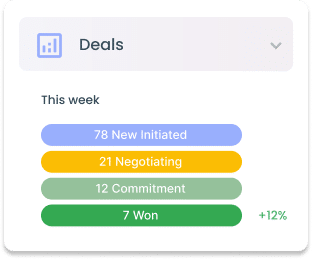
Enhanced Users’ Sales Efficiency
Access to the latest company data and professional insights empowers sales teams to optimize their workflows, focusing their efforts on the most promising leads for better results.

Data Insights
Integrating Sales Navigator data with existing customer information offers a more comprehensive market view, enabling well-informed business decisions and strategic optimizations for enhanced user experiences.
Data Insights
Integrating Sales Navigator data with existing customer information offers a more comprehensive market view, enabling well-informed business decisions and strategic optimizations for enhanced user experiences.
Sales Navigator Search API and Other Essential Features
The Sales Navigator Search API empowers developers to integrate LinkedIn’s advanced search capabilities into their applications, providing access to rich, professional data for superior lead generation. Alongside this, essential features such as automated data extraction and personalized outreach automation strategies enhance CRM messaging integration, streamlining sales processes and improving engagement rates.
Sales Navigator Data Sync

Efficiently synchronize LinkedIn search results with your CRM software, streamlining the organization and retrieval of valuable lead information.
LinkedIn Direct Outreach

Enable your users to enhance direct communication by sending automated, personalized InMails within the software, boosting engagement and response rates.
Sales Navigator Search to Lead Conversion

Seamlessly convert search results from Sales Navigator into actionable leads, enhancing your ability to connect with potential clients efficiently.
Automate Messaging from Sales Navigator Connections

Leverage Sales Navigator to automate your messaging sequences, ensuring timely and personalized communication with new connections to boost engagement.
LinkedIn Features with Unipile’s API Integration
| Features |
LinkedIn
|
|---|---|
| Account connection | |
| Hosted Auth: White label to connect your end users |  |
| Custom auth: connect user with credentials, cookies, your chrome extension | |
| Messages | |
| Send & Reply Messages | |
| Send an InMail | |
| List Messages, Chats & Attendees | |
| List Reactions | |
| Read Receipts | |
| Send Files attachments | |
| Receive Files attachments API | |
| Send Voice Notes | |
| Send Embed Video | |
| Users/Profiles | |
| Retrieve a Profile | |
| Retrieve & Edit own profile | |
| List all relations & Followers | |
| List all Invitations Sent & Received | |
| Handle & Cancel a received Invitation |
|
| Send an Invitation |
|
| Cancel an Invitation |
|
| List all posts, comments, reactions |
|
| Posts | |
| Retrieve & Create a post |
|
| List all comments from a post |
|
| List all posts, comments, reactions |
|
| Comment a post |
|
| List all reactions from a post |
|
| Add a reaction to a post, comment |
|
| Webhooks | |
| Account status | |
| New Message | |
| New Reaction / Read / Event | |
| Specific | |
| Retrieve Recruiter hiring projects | |
| Perform an action with a user profile | |
| Retrieve a company profile |
|
| Get raw data from any endpoint (Inbox Search, Following someone, Get own profile viewers, Social Selling Index, Retrieve posts from Feed) | |
| Get inmail credit balance | |
| Retrieve LinkedIn search parameters |
|
| Perform Linkedin search | |
| List all job postings | |
| Create a job posting |
|
| Get job posting | |
| Publish a job posting | |
| Solve a job publishing checkpoint | |
| Close a job posting | |
| List all applicants to a job posting |
|
| Get a specific applicant to a job posting |
|
| Download the resume of a job applicant |
|
| Endorse a user profile specific skill |
|
| Webhooks | |
| Account status | |
| New Message | |
| New Reaction / Read / Event | |
| Inboxes | |
| LinkedIn Classic Inbox | |
| Sales Navigator Inbox | |
| LinkedIn Recruiter Inbox | |
| LinkedIn Company Page | |

LinkedIn Features
| Features |
LinkedIn
|
|---|---|
| Account connection | |
| Hosted Auth: White label to connect your end users | |
| Custom auth: connect user with credentials, cookies, your chrome extension | |
| Messages | |
| Send & Reply Messages | |
| Send an InMail | |
| List Messages, Chats & Attendees | |
| List Reactions | |
| Read Receipts | |
| Send Files attachments | |
| Receive Files attachments API | |
| Send Voice Notes | |
| Send Embed Video | |
| Users/Profiles | |
| Retrieve a Profile | |
| Retrieve & Edit own profile | |
| List all relations & Followers | |
| List all Invitations Sent & Received | |
| Handle & Cancel a received Invitation |
|
| Send an Invitation |
|
| Cancel an Invitation |
|
| List all posts, comments, reactions |
|
| Posts | |
| Retrieve & Create a post |
|
| List all comments from a post |
|
| List all posts, comments, reactions |
|
| Comment a post |
|
| List all reactions from a post |
|
| Add a reaction to a post, comment |
|
| Webhooks | |
| Account status | |
| New Message | |
| New Reaction / Read / Event | |
| Specific | |
| Retrieve Recruiter hiring projects | |
| Perform an action with a user profile | |
| Retrieve a company profile |
|
| Get raw data from any endpoint (Inbox Search, Following someone, Get own profile viewers, Social Selling Index, Retrieve posts from Feed) | |
| Get inmail credit balance | |
| Retrieve LinkedIn search parameters |
|
| Perform Linkedin search | |
| List all job postings | |
| Create a job posting |
|
| Get job posting | |
| Publish a job posting | |
| Solve a job publishing checkpoint | |
| Close a job posting | |
| List all applicants to a job posting |
|
| Get a specific applicant to a job posting |
|
| Download the resume of a job applicant |
|
| Endorse a user profile specific skill |
|
| Webhooks | |
| Account status | |
| New Message | |
| New Reaction / Read / Event | |
| Inboxes | |
| LinkedIn Classic Inbox | |
| Sales Navigator Inbox | |
| LinkedIn Recruiter Inbox | |
| LinkedIn Company Page | |
How to Integrate the Sales Navigator Search API in Your CRM
To effectively integrate Sales Navigator data into your CRM, start by thoroughly reviewing the LinkedIn API documentation to understand its capabilities and limitations. Configure your CRM to match the API’s data structure, emphasizing key data points that will enhance customer profiles and provide valuable sales insights. Establish a system to regularly import updated data, ensuring dynamic lead management and strategic sales decision-making. Regular maintenance and testing are essential to ensure the integration remains smooth and effective.

Developer Advantages of the Sales Navigator Search API


Dedicated Support Throughout Integration
Our committed support team is ready to assist you at every step—before, during, and after the integration process. They provide real-time help to ensure seamless integration without incurring additional costs.
Developer Support
Efficiently integrate the LinkedIn Invite API using our comprehensive documentation and sample code. These resources are tailored to simplify your integration effort and enhance your application’s capability to send invitations.
Consistent Updates and Maintenance
Benefit from ongoing updates and proactive maintenance with the LinkedIn Invite API. This keeps the API functioning smoothly, in line with LinkedIn’s latest standards and enhancements, thus minimizing downtime and boosting performance.
FAQs
What is the Sales Navigator Search API?
The Sales Navigator Search API is a powerful tool provided by LinkedIn that allows developers and editors to access and utilize LinkedIn’s extensive professional database to enhance applications and content strategies. Detailed technical prerequisites would be specified in the developer documentation provided by Unipile.
How can developers benefit from the Sales Navigator Search API?
Developers can use the Sales Navigator Search API to build applications that require access to professional data, enabling sophisticated searches and integration of LinkedIn’s powerful search capabilities. This enhances application functionality with relevant and actionable information.
How can editors use the Sales Navigator Search API to improve content?
Editors can leverage the API to tailor content for specific audiences by accessing detailed professional information. This helps create content that resonates with targeted demographics, improving user engagement and content relevance.
What are the key features of the Sales Navigator Search API?
The key features include advanced search capabilities, automated data extraction, personalized outreach strategies, and integration with CRM systems. These features streamline sales processes and improve engagement rates.
How does the Sales Navigator Search API enhance project development?
By accessing LinkedIn’s comprehensive database, the API allows developers to build applications with rich professional insights and functionalities, significantly enhancing project development efforts.
How does the API improve sales efficiency?
Access to the latest company data and professional insights empowers sales teams to optimize their workflows, focusing efforts on the most promising leads for better results.
How can Sales Navigator data be integrated into a CRM?
Access to the latest company data and professional insights empowers sales teams to optimize their workflows, focusing efforts on the most promising leads for better results.
How can Sales Navigator data be integrated into a CRM?
To integrate Sales Navigator data into a CRM, review the LinkedIn API documentation, configure your CRM to match the API’s data structure, and set up regular data synchronization. Regular maintenance and testing are essential to ensure smooth and effective integration.
What are the benefits of integrating Sales Navigator data with existing customer information?
Integrating this data provides a more comprehensive market view, enabling well-informed business decisions and strategic optimizations for enhanced user experiences.
You may also like
Gmail API Key vs OAuth: Why You Can’t Skip OAuth (and What to Use Instead)
Path 1 of 3 Path 1 - OAuth 2.0 Client ID (Multi-Tenant SaaS) If you're building a SaaS product where your customers connect their own Gmail accounts, the OAuth 2.0 authorization code flow is the standard path. This is the 3-legged flow: your app, Google, and the end user. It requires setting up a...
Sync vs Transactional Email APIs: Which One Do You Actually Need? (2026)
Unipile - Sync vs Transactional Hero (Light) Email API Strategy Sync vs TransactionalEmail APIs: Which OneDo You Actually Need? Two markets, two completely different architectures. If you are building a CRM, ATS, or AI inbox tool, you need a sync email API. If you are sending password resets, you...
Microsoft Graph OAuth: Authenticate Outlook and Microsoft 365 Mailboxes (2026 Guide)
Microsoft Graph OAuth 2026 Microsoft Graph OAuth: Authenticate Outlook and Microsoft 365 Mailboxes A complete 2026 guide to Microsoft Graph OAuth for SaaS developers. Covers Microsoft Entra app registration, authority endpoints, Mail scopes, delegated vs application permissions, admin consent,...
 EN
EN  FR
FR  ES
ES  DE
DE  IT
IT  BR
BR  NL
NL  PL
PL  TR
TR