
 LinkedIn
 WhatsApp
 Telegram
 Gmail
Gmail Outlook
 Google Calendar
 Join Slack Community
DMA
Our solution is built in line with the Digital Markets Act (DMA). User profiles are never stored or scraped, and our API focuses exclusively on enabling messaging interoperability. Clients are expected to comply with the terms of each provider.
Instagram is now a key communication channel for businesses, recruiters, and creators. To support this shift, Meta provides the Instagram API — a secure way to manage content, track performance, and interact with audiences on professional accounts.
However, direct integration with Meta’s API can be complex and time-consuming.
With Unipile, software publishers can instantly connect Instagram (and other channels like LinkedIn, WhatsApp, Gmail, and calendars) through one unified API, no OAuth headaches, no rate-limit surprises, just fast, scalable integration.
Introduction to Instagram Graph API

The Instagram Graph API is no longer optional for modern software tools. For CRM platforms, ATS solutions, and outreach automation tools, the ability to integrate direct messaging and manage engagement has become a core expectation. If you’re building software for professionals, your users want to send and receive messages, synchronize conversations, and interact with their audience without leaving your product.

What Is the Instagram Graph API?
The Instagram Messaging API is Meta’s official way for developers to access and manage conversations on Instagram. It is available only for Business and Creator accounts, and is part of the broader Meta Graph infrastructure.
This API gives software products secure, permission-based access to:
-
Send and receive direct messages,
-
Reply to user inquiries in real time,
-
Manage conversations across teams with shared inboxes,
-
Improve response times and strengthen user engagement.
For software publishers, the Messaging API is the foundation for integrating Instagram conversations natively into CRMs, support desks, and outreach tools, enabling seamless communication without switching platforms.
Who Can Use the Instagram Graph API?
The API is not publicly open. To use it, the end-user must:
-
Have an Instagram Business or Creator account,
-
Link it to a Facebook Page,
-
Grant your app permissions through the Facebook App Review process.
As a software editor, you’d typically need to build a Facebook App, submit for approval, manage scopes, refresh tokens, and ensure ongoing compliance with Meta’s policies. That process can take weeks, or months, and even then, access is limited and highly controlled.
Unipile removes all of that friction. You don’t need to build or maintain a Facebook app. We act as a verified intermediary. You get API access to your users’ Instagram data and messaging features through our platform, with a simple token-based auth flow. Fully secure. Fully scalable. Zero Meta headaches.
Core Features of the Instagram Graph API
When integrated, the Instagram Messaging API becomes a powerful asset inside your product. Let’s break down the capabilities.
Your users can send and receive direct messages directly from your interface, ensuring real-time conversations without switching apps. Messages can be organized, assigned, and synchronized across teams, enabling shared inbox workflows for sales, support, or recruiting.
Advanced features allow you to reply to user inquiries, handle message threads, and maintain full visibility over interactions. This makes it easier to keep conversations consistent and professional across every account.
All of this is available with the Instagram Messaging API, and instantly accessible with Unipile.
Authentication & Permissions: Simplified with Unipile
OAuth 2.0 is powerful. It’s also a pain to manage. Facebook’s version is particularly strict: custom app setup, callback URLs, token refresh logic, permission scope management, and App Review re-validations every time you add a new scope.
Unipile handles all of it for you. You initiate an account connection via a single endpoint. Your user sees a branded UI to authenticate. Once complete, we return an access token. That’s it.
No dev time wasted on OAuth workflows. No risk of expired tokens. No unexpected permission denials. Just plug-and-play authentication that scales.
This applies not only to Instagram but also to LinkedIn, WhatsApp, Gmail, Outlook, Telegram, and more, all unified through the same interface.
Unified Inbox: Instagram + LinkedIn + Gmail in One View
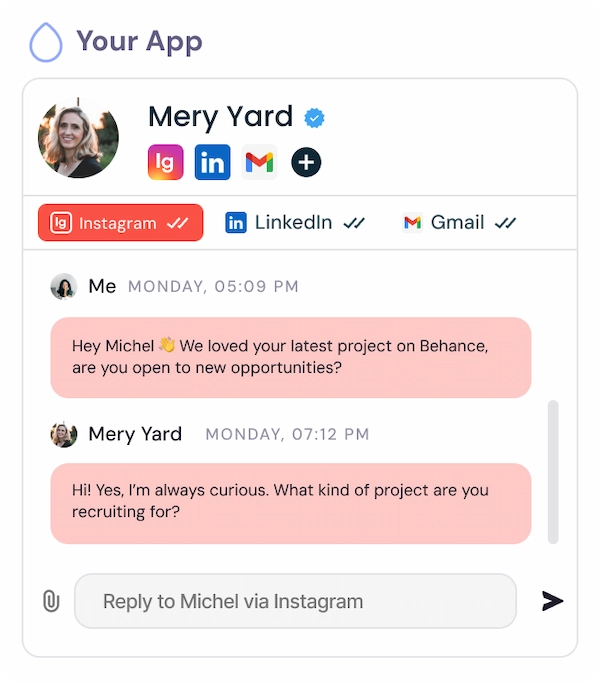
Managing conversations across multiple channels is a daily challenge for your users, whether they’re recruiters, sales reps, or customer-facing teams. With Unipile’s unified inbox, you can centralize Instagram, LinkedIn, Gmail, WhatsApp, and more into one simple view. No more platform switching. No more fragmented messaging.
Thanks to the Instagram Graph API, your users can read and reply to Instagram DMs, comments, and mentions directly from your app. They’ll see real-time conversations from Instagram alongside Gmail threads, WhatsApp messages, and LinkedIn chats, all in a single interface.
Each channel remains fully contextual and interactive. Your product becomes the new communication hub, powered by smart syncing and enriched with native API support.
This unified inbox, backed by the Instagram Graph API and our broader messaging API stack, turns your software into a central workspace, where responses are smarter, and multi-channel relationships are finally seamless.
Why Choose Unipile Over DIY or Meta Direct Integration
Direct API access means full control. But it also means full responsibility.
When you build on Meta directly, you have to:
-
Register and manage a Facebook App,
-
Maintain OAuth flow and token refresh logic,
-
Stay compliant with Meta’s App Review policies,
-
Handle API changes and deprecations,
-
Deal with quota limits and error debugging.
With Unipile, you avoid all of that. You integrate in 2 days, not 2 months. You access not only Instagram, but also LinkedIn, WhatsApp, Telegram, Gmail, and Calendar, all from one interface. We maintain the stack. We monitor the quotas. We evolve the API for you.
You ship faster. You deliver more value. You focus on your product.
| Criteria | Meta APIs | Unipile |
|---|---|---|
| Time to integrate | Weeks or months | 2–3 days |
| Dev effort | High | Low (REST + SDKs) |
| Maintenance | Manual | Fully managed |
| Access to features | Partial (after approval) | Full, instantly |
| Support | Self-service only | Dedicated tech team |
| Criteria | Meta APIs | Unipile |
|---|---|---|
| Time to integrate | Weeks/months | 2–3 days |
| Dev effort | High | Low (REST + SDKs) |
| Maintenance | Manual | Fully managed |
| Access to features | Partial (after approval) | Full, now |
| Support | Self-service only | Dedicated tech team |
Step-by-Step: How to Integrate the Instagram Graph API with Unipile
Integration with Unipile is straightforward and fast. Here’s how it works:
- Create your Unipile developer account. You’ll receive your DSN (Data Source Name) and access token.
- Trigger account connection. Use our /accounts endpoint to initiate the Instagram authentication flow for your users.
Sign Up to Unipile
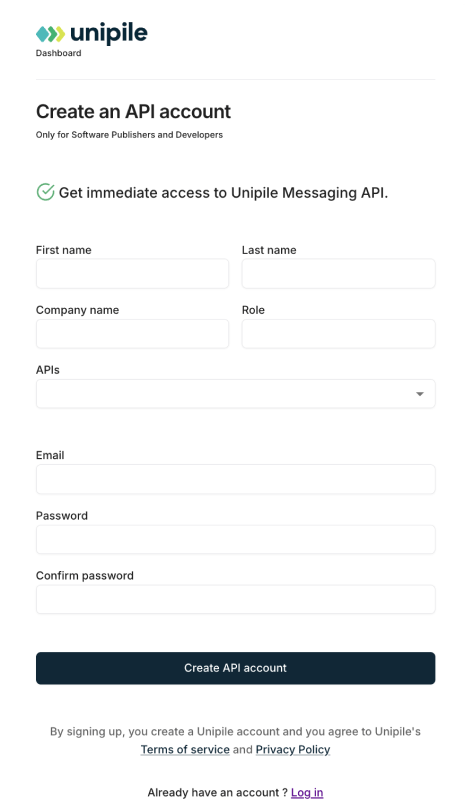
Log to Dashboard
Access your workspace and manage your connected accounts.

Retrieving your Instagram credentials
To perform an authentication for Instagram, a user need its INSTAGRAM username and password. Authentication via Facebook credentials is not supported at the moment.
Authentication
Make a POST request to this Unipile API endpoint or use the appropriate SDK Method.
curl --request POST \
     --url https://{YOUR_DSN}/api/v1/accounts \
     --header 'X-API-KEY: {YOUR_ACCESS_TOKEN}' \
     --header 'accept: application/json' \
     --header 'content-type: application/json' \
     --data '
{
  "provider": "INSTAGRAM",
  "username": "unipile",
  "password": "********"
}
'
Handle 2FA checkpoint
If an Instagram account has the two-factor authentication activated, you will encounter a checkpoint through a 202 status. Here’s an example of a checkpoint response.
{
  "object": "Checkpoint",
  "account_id": "098dez89d",
  "checkpoint": {
    "type": "2FA"
  }
}
In this case, a new Authentication Intent starts. This intent last 5 minutes and checkpoints must be solved in this time frame.
Solve 2FA checkpoint
To solve the 2FA checkpoint, make a POST request to the Unipile API using the Solve checkpoint endpoint or use an SDK Method by giving the account_id returned by the first request.
curl --request POST \
     --url https://{YOUR_DSN}/api/v1/accounts/checkpoint \
     --header 'X-API-KEY: {YOUR_ACCESS_TOKEN}' \
     --header 'accept: application/json' \
     --header 'content-type: application/json' \
     --data '
{
  "provider": "INSTAGRAM",
  "account_id": "098dez89d",
  "code": "******"
}
'
Handle Intent Timeout
If the user takes more than 5 minutes to solve the checkpoint, the account will not be connected. Any subsequent request to solve a checkpoint outside a 5 minutes time frame will first respond a 408 – Request Timeout, then a 400 – Bad Request as the Authentication Intent will self destroy.
Essential Instagram API Features for Software Integration
Key Features of Instagram API by Unipile
Instagram Features


Account connection
Hosted Auth: White label to connect your end users
Custom auth: connect user with credentials, cookies, your chrome extension
Messages
Send & Reply Messages
List Messages, Chats & Attendees
Sync History
List Reactions
Read Receipts
Send Files attachments
Receive Files attachments
Webhooks
Account status
New Message
New Reaction / Read / Event
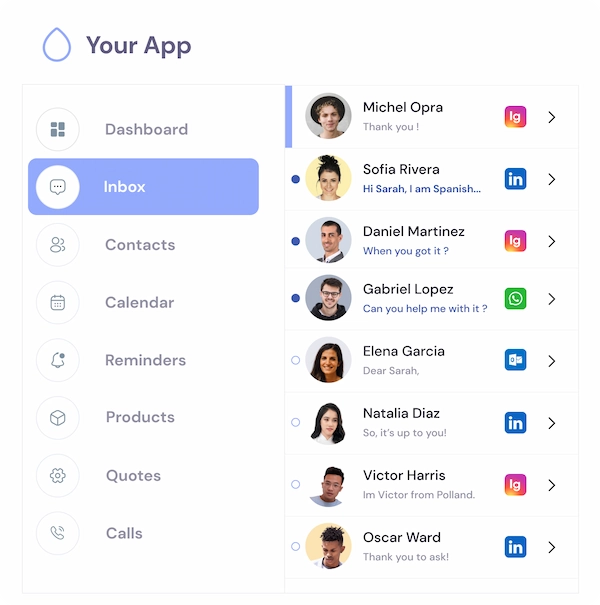
Multi-Channel Inbox with Instagram Messaging Built-In

Give your users the freedom to manage Instagram conversations just like email or LinkedIn messages, directly inside your software.
With the power of the Instagram Graph API, Unipile lets you embed DMs, comments, and replies in your app’s inbox, next to WhatsApp chats, Gmail threads, or LinkedIn messages. Users can reply, follow up, or take action in context, without switching tabs or platforms.
From recruiters chatting with candidates, to sales teams engaging prospects, this inbox gives a full picture of every conversation, across every channel. It’s not just a messaging integration. It’s a productivity shift, and it’s powered by one unified API.
Instagram Graph API in Action
Use the /users/identifier endpoint to fetch Instagram profile data, and /chats to list all conversations, including DMs and replies, powered by the Instagram Graph API through Unipile.
Test instantly with cURL or integrate directly into your backend logic for real-time sync and omnichannel communication.
curl --request GET
     --url https://api1.unipile.com:13111/api/v1/chats
     --header 'accept: application/json'
Use Cases for CRM, ATS, and Outreach Tools
If you’re building a CRM, Instagram is becoming a crucial communication touchpoint, especially in verticals like beauty, real estate, or coaching. With Unipile, you allow sales teams to see Instagram messages and DMs alongside email and LinkedIn. No more context switching.
For ATS software, managing employer branding and candidate engagement on Instagram is a must. You can publish open roles and automate follow-ups when someone interacts with a post, directly from your platform.
In outreach automation, multi-channel is king. Imagine a sequence where Day 1 is a LinkedIn invite, Day 3 is an email, Day 5 is a DM on Instagram, and Day 7 is a WhatsApp message. All orchestrated by your system. All powered by one API.
That’s what Unipile enables.
Metrics, Webhooks, and Real-Time Sync
The Instagram Messaging API provides access to direct conversations in real time. With Unipile, your users can:
-
Send and receive DMs seamlessly inside your product
-
Reply to message threads without switching apps
-
Assign or share conversations across a team with a shared inbox
-
Stay in sync in real time with message updates and status changes
We also provide webhooks for instant events such as new incoming messages or replies, enabling you to trigger automations in your product, whether that’s notifying a teammate, creating a CRM task, or updating a user’s profile.
Automation, Calendar Sync, and Omnichannel Power
What makes Unipile different is the way it combines messaging and calendar data.
Your users can schedule an Instagram post in their calendar, align it with campaigns on LinkedIn or Gmail, and track everything in one timeline. We unify Gmail, Outlook, Google Calendar, and Outlook Calendar, giving you true cross-channel orchestration.
Build smart outreach flows, personal assistants, or marketing schedulers with real context across all touchpoints — not just Instagram.
Bring the Power of Instagram Graph API Into Your Product
The Instagram Messaging API is essential, but Meta’s ecosystem can be complex and restrictive. Building a compliant integration from scratch takes time and resources.
With Unipile, you deliver Instagram messaging to your users in just days, fully synced, easy to scale, and embedded inside your product. We are not a Meta Partner, and all usage must respect Meta’s rules, ensuring responsible and legitimate messaging.
Unipile’s unified API also connects LinkedIn, WhatsApp, Gmail, Outlook, and calendars, giving your users a single, streamlined interface for all conversations.
Integration Support and Resources for Instagram API Success


Dedicated Assistance During Integration
Our support team is with you every step of the way, before, during, and after integration, to ensure a seamless experience. We’re here to provide real-time assistance, helping you avoid any hiccups and extra costs.
Comprehensive Developer Resources
Our API comes with detailed documentation and sample code to simplify integration. These resources are designed to enhance your application’s capabilities, making the process of sending messages and others smoother and more efficient.
Ongoing Updates and Maintenance
With proactive updates and regular maintenance, our API remains aligned with Instagram’s latest standards and improvements, ensuring consistent performance and minimizing any potential downtime.
FAQs
Is Instagram Graph API free?
Yes — the Instagram Graph API is technically free to use. However, it’s only accessible through approved Meta developer apps, and usage is subject to rate limits. For businesses, the real cost lies in development time, maintenance, and compliance with Meta’s platform rules. Using Unipile reduces these costs significantly by eliminating the need for a dedicated Meta app and simplifying token management.
How to use the Instagram Graph API?
To use the Instagram Graph API, you must:
-
Have a Business or Creator Instagram account,
-
Connect it to a Facebook Page,
-
Authenticate via Meta’s OAuth 2.0 flow,
-
Request the appropriate permissions (e.g.,
pages_show_list,instagram_basic,ads_management, etc.), -
Use the API to fetch insights, manage posts, read comments, and more.
With Unipile, this process is reduced to a simple account connection — no need to manage Meta’s app review, tokens, or permission scopes manually.
Is Unipile’s Instagram API DMA compliant?
Yes. Our API is designed in line with the Digital Markets Act (DMA). We only provide interoperability for messaging and do not store or scrape user profiles. Please note that Unipile is not a Meta Partner, and our solution focuses exclusively on secure and compliant messaging use cases.
Are there limits or conditions when using Unipile with Meta platforms?
Yes. Clients must always respect Meta’s Terms of Service. This means avoiding spam, mass automation, or unauthorized scraping. The API should only be used for legitimate messaging scenarios such as customer support, team communication, or user interactions, while acting responsibly and within Meta’s rules.
What is the limit of Instagram Graph API?
Meta enforces rate limits on the Graph API to ensure platform stability. These limits vary based on the endpoint and user activity. For example:
-
Media publishing is typically limited to 25 posts per user per 24 hours,
-
Insights requests may be capped based on burst usage,
-
Some endpoints return paginated data to prevent overload.
Unipile monitors and optimizes API usage behind the scenes so you stay within safe quotas — without hitting hard stops or error codes.
What is the difference between Instagram Graph API and Instagram Basic Display API?
The Instagram Graph API is for business use. It supports data access for Business and Creator accounts, enables publishing, insights tracking, and community interaction.
The Instagram Basic Display API is for personal use. It allows users to sign in with Instagram and fetch profile data and photos, but it doesn’t support publishing, insights, or managing comments.
If you’re building software for professionals — CRM, ATS, outreach tools — only the Graph API is relevant. That’s the API Unipile supports and simplifies for integration.
You may also like
The Complete Unipile API Guide: LinkedIn, Instagram, WhatsApp, Email and AI Agents
Click to Expand 11 Things Developers Actually Build With Unipile Click any use case to see the real endpoints and a working code snippet. These are patterns pulled directly from how Unipile customers use the API today, not theoretical examples. LinkedIn Reply to a LinkedIn message from your own...
Multi-Channel API for AI Agents: Email, LinkedIn & WhatsApp (2026)
Agent Use Cases Agent use cases: what multi-channel unlocks The following use cases represent the most common patterns where a multi-channel API for AI agents delivers measurable value over a single-channel approach. Each pattern describes the job the agent performs, why multiple channels are...
Email API Use Cases: 5 Ways B2B SaaS Products Use Inbox Sync (2026)
Use Case 01 Email API for CRM A CRM that uses an email API can automatically log every email exchanged between a rep and a prospect directly onto the contact record - without any copy-paste. The email API reads the user's inbox on behalf of the authenticated rep, matches threads to existing...
 EN
EN  FR
FR  ES
ES  DE
DE  IT
IT  BR
BR  NL
NL  PL
PL  TR
TR